Govee H6047 Gaming Light Bars Complete Review: Is It a Smart Buy? (2026)
Check Govee H6047 Gaming Light Bars Pricing
8.3/10 Editor's Rating- Active Offers: View current discounts and promotional deals
- Free Delivery: Eligible for free shipping and free returns
- Stock Status: Check real-time stock and configuration options
What We Like
- Dedicated smart desktop dial controller
- Native Razer Chroma software integration
- Multi-zone RGBIC custom color addressability
- Direct PC audio output visualization
What Could Be Better
- No monitor camera for TV screen-matching
- Requires running background PC desktop app
Jump to Section
- Govee Desktop Light Bars Review: Ideal User Profiles
- Hardware Design & Smart Dial Controller Mechanics
- RGBIC Color Addressability & Audio Synchronization
- Software Integration & Ecosystem Compatibility
- Scene Modes & Daily Ergonomic Illumination
- Limitations & Technical Drawbacks
- Long-Term Value & Verdict
- Frequently Asked Questions
- Specifications
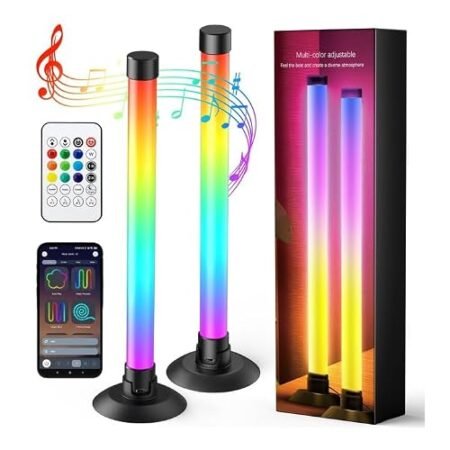
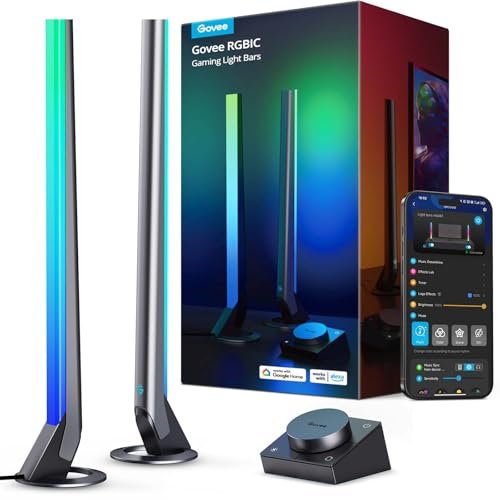
Doesn’t standard backlighting fail to deliver deep immersion, meaning the govee h6047 gaming light bars are not just simple RGB lamps, but a dedicated desktop illumination system. These dual vertical light towers utilize internal addressable color zones alongside dual wireless protocols to project reactive lighting across your surrounding walls.
Why it stands out: The hardware incorporates an independent desktop dial control module that provides tactile adjustment over brightness and scene modes without interrupting active software tasks. This physical interface bridges the gap between software-based customization and quick manual toggles.
By removing the dependency on external monitor-mounted cameras, the housing maintains clean desktop aesthetics while pulling audio signals directly from PC software or headset feeds. Consequently, the internal illumination engine converts sound spikes and software triggers into zero-latency visual telemetry.
Govee Desktop Light Bars Review: Ideal User Profiles
Selecting the proper illumination system depends heavily on your existing PC peripherals and desktop footprint. The following user profiles highlight where these active light towers deliver maximum visual impact.
- Chroma Ecosystem Users: Gamers seeking native software synchronization with PC peripherals through unified lighting suites.
- Tactile Control Enthusiasts: PC operators who prefer physical rotary dials over opening mobile apps to switch light modes mid-session.
- Clean-Desk Builders: Setup designers wanting vibrant ambient backlighting without mounting heavy camera hardware onto thin monitor bezels.
Hardware Design & Smart Dial Controller Mechanics
Each light tower measures over seventeen inches in height, casting illumination across wide wall areas behind monitors. The dark grey polymer casing blends into modern desk setups without causing reflective distractions during intense gameplay.
Engineers engineered the base weighting to prevent tipping when desk surfaces experience movement or physical vibrations. The matte exterior shell diffuses light evenly across the front channel to eliminate harsh hot spots.
Central to this physical interface is the standalone smart desktop dial controller, which sits comfortably near your keyboard. Rotating the smooth dial adjusts lumen output instantly, while single and double taps cycle through active lighting presets.
This physical controller operates without requiring line-of-sight transmission to the light bars, ensuring reliable responses. Hardwired connections between the central hub and light towers guarantee zero signal dropouts during rapid adjustments.
The physical footprint remains compact enough to fit between full-sized mechanical keyboards and large mousepads. Underneath the controller base, high-friction rubber pads anchor the unit securely to desk mats during rapid dialing.
Cable management routing is simplified through unified rear ports that keep power lines hidden behind monitor arms. This physical layout minimizes desk clutter while providing full reach to external power outlets.
See Current Govee Pricing
- Live Pricing: Find out exactly what this is selling for right now.
- Shipping Times: See how fast this can arrive at your front door.
- Stock Status: Make sure it is actually in stock before you make a decision.
RGBIC Color Addressability & Audio Synchronization
Unlike standard RGB fixtures that project a single uniform shade across the entire strip, RGBIC technology enables individual segment control. Multiple color nodes operate along each light bar simultaneously, creating fluid gradients and dynamic chasing effects across your backwall.
Software specifications detailed in Razer Chroma ecosystem documentation reveal how multi-zone lighting protocols assign independent colors across single light channels. This high level of addressability allows complex light routines to match active gaming events.
Audio reactive modes operate via an internal sound pickup mechanism that samples both ambient room audio and direct system outputs. High frequencies produce rapid color pulses along the upper segments, while bass drops trigger full-bar illuminations.
Plugging headphones into your PC does not disrupt the audio visualization features. The system reads digital sound outputs straight from desktop drivers to maintain reactive lighting during late-night gaming sessions.
Over long-term usage, the internal light diffusion panel prevents individual LED diodes from degrading in color accuracy. Heat dissipation channels embedded in the rear spine ensure cool operation during continuous full-brightness sessions.
Color reproduction spans up to 16.8 million shades, allowing precise color matching with custom desktop wallpapers or cooling fan profiles. Smooth transition algorithms prevent jarring jumps between contrasting hues.
Software Integration & Ecosystem Compatibility
Configuring the govee h6047 gaming light bars involves connecting through both Bluetooth and 2.4GHz Wi-Fi modules embedded in the internal controller. Dual wireless chips ensure fast local app responsiveness alongside cloud-based voice command integration.
The Govee Home mobile app unlocks DIY light creation suites where users paint individual segments with custom colors. Preset libraries include over sixty scene modes designed for intense gaming or relaxed evening illumination.
Bridging the hardware to PC software requires installing both the Govee Desktop App and Razer Synapse 3. Once linked, light bars sync in real time with ambient game events and peripheral lighting effects.
Syncing across external software platforms allows health bars, cooldown timers, and damage indicators to reflect directly through wall illumination. This software unification creates a cohesive visual sphere around your monitor mount.
Voice controls function through Alexa and Google Assistant integrations, allowing basic power toggles and scene switches via hands-free queries. Response latency over local Wi-Fi networks remains sub-second for basic voice commands.
Firmware updates push wirelessly through the mobile app, continually refining color translation accuracy and adding new lighting scenes. Settings save directly to internal flash memory, retaining your preferences after power cycles.
Scene Modes & Daily Ergonomic Illumination
Beyond high-intensity gaming feedback, ambient backlighting serves a practical functional role by reducing eye strain in dark environments. Projection against backwalls raises surrounding ambient light levels, softening the glare from bright HDR monitors.
Selecting calm scene presets transforms high-octane gaming setups into calm workspaces for daytime productivity. Lower color temperatures offer warm bias lighting that reduces visual fatigue during extended document editing.
Custom timers allow light schedules to automate around daily working routines, dimming gradually as evening approaches. This feature supports healthy circadian rhythms without requiring manual adjustments.
For content creators, ambient light modes offer soft background illumination that improves web camera exposure during video calls. Balanced light distribution removes harsh shadows behind streamer seating positions.
The high lumen output capability ensures background illumination remains visible even in daylight-lit office spaces. Diffusing elements spread beam angles wide enough to cover massive dual-monitor desk layouts.
Long-term material resilience shows no signs of frame discoloration or plastic warping from internal LED thermals. The steady power supply prevents flickering across all brightness intervals, protecting user eye comfort.
Limitations & Technical Drawbacks
While sound reactivity and software sync perform reliably, this model does not include an optical camera sensor. Consequently, direct screen color matching for video streaming or console TV setups is not supported out of the box.
Unlocking full PC game sync requires running background desktop software on your computer at all times. Users seeking pure standalone hardware operation without background computer apps may find software setup multi-layered.
Long-Term Value & Verdict
The govee h6047 gaming light bars deliver deep lighting integration for PC setups where peripheral sync and reactive audio matter most. High addressability through RGBIC hardware ensures vibrant visual performance that scales across daily gaming and work routines.
Solid physical construction, paired with a dedicated desktop dial, eliminates common frustrations associated with mobile-only light controls. Structural longevity and steady software updates protect your long-term setup investment.
The verdict: For gamers looking to expand their room illumination through native Razer Chroma sync and physical dial responsiveness, these light towers provide outstanding performance and desktop utility.
Frequently Asked Questions
Do the govee h6047 gaming light bars include a camera for screen mirroring?
No, this model does not use a monitor camera and relies instead on software integration or audio pickup to sync lighting. Screen color sampling requires connecting through the desktop app software on a PC.
How does the smart desktop dial controller connect to the light bars?
The smart desktop dial connects directly through hardwired cable routing to the central junction system. This physical connection guarantees instant responses without wireless signal delay.
Can these light bars sync with Razer Chroma software?
Yes, full Razer Chroma integration is supported via the Govee Desktop App and Razer Synapse 3 software on PC. This allows light bars to match lighting effects across compatible keyboards, mice, and mousepads.
Will audio visualization work while wearing gaming headphones?
Yes, the lighting system captures digital audio streams directly through desktop drivers when linked via PC software. This ensures reactive lighting pulses accurately even when speaker output is muted.
Can I control these gaming light bars using voice commands?
Yes, the lights support hands-free voice commands when connected to Wi-Fi via Alexa or Google Assistant. You can toggle power, adjust brightness, or change scene modes using voice commands.
Specifications
Ready to Upgrade Your Workspace?
8.3/10 Editor's Rating- Free Shipping: Eligible for fast and free delivery to your door
- Manufacturer Warranty: Backed by full brand support and coverage
- Flexible Returns: Shop with complete buyer protection and peace of mind
More Ambient & RGB Lighting Reviews