AULA S98 Pro Wireless Mechanical Keyboard Full Review: Worth Every Penny? (2026)
Check AULA S98 Pro Wireless Mechanical Keyboard Pricing
9.3/10 Editor's Rating- Active Offers: View current discounts and promotional deals
- Free Delivery: Eligible for free shipping and free returns
- Stock Status: Check real-time stock and configuration options
What We Like
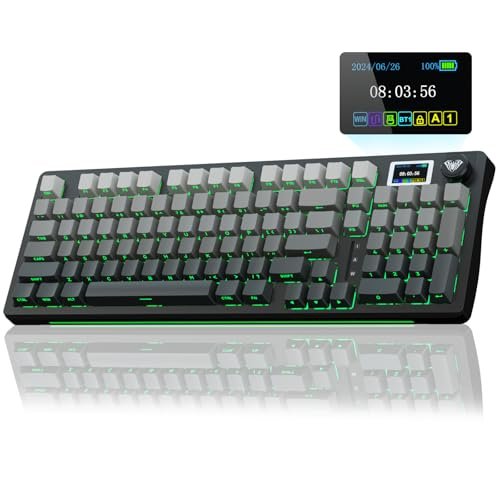
- Smart LCD screen with control knob
- Creamy pre-lubricated switches and stabilizers
- Five-layer sound dampening gasket structure
- Long-lasting 5000mAh battery life
What Could Be Better
- Windows software required for GIF updates
- Screen setup needs wired mode connection
Jump to Section
- AULA S98 Pro Custom Board Review: Ideal User Profiles
- Ergonomic Shape & Desk Layout
- Switch Options & Acoustic Gasket Mount
- Keycap Quality & RGB Backlighting
- Connectivity Speed & Battery Efficiency
- Real Limitations & Software Trade-Offs
- Long-Term Value & Final Verdict
- Frequently Asked Questions
- Specifications
While budget brands routinely promise custom desktop performance without premium prices, the aula s98 pro wireless mechanical keyboard enters a crowded market full of visual gimmicks; desk setup enthusiasts often wonder if an onboard display provides real utility or just costs extra cash. You might expect cheap plastic construction and clunky drivers from a feature-packed peripheral at this price point!
Why it stands out: Packed with a multi-function metal knob, a smart customizable screen, and a deeply acoustic gasket layout, this board targets buyers wanting custom-feeling hardware without building from scratch. The integrated dampening foam isolates keypress feedback to deliver a smooth acoustic profile right out of the box.
Skeptical typists often worry that multi-mode wireless boards sacrifice signal stability for fancy lighting controls. This deck directly addresses those concerns with high-capacity power delivery and reliable three-mode wireless options.
AULA S98 Pro Custom Board Review: Ideal User Profiles
Choosing a desktop peripheral requires matching its physical layout and connection modes to your daily workflow. The following user profiles highlight who gets the most value from this specific setup.
- Multi-Device Professionals: Operators who regularly jump between laptop, desktop, and tablet setups benefit from quick physical knob swapping across five stored wireless profiles.
- Custom Keyboard Enthusiasts: Gamers who love swapping switches without soldering iron kits appreciate the hot-swappable PCB socket arrangement.
- Late-Night Desk Workers: Users needing clear key visibility in dark rooms gain maximum clarity from side-engraved PBT keycaps combined with south-facing LEDs.
Ergonomic Shape & Desk Layout
The compact footprint retains a full numeric keypad while trimming unnecessary frame bezel real estate. That smart spatial layout keeps your mouse closer to your center body position, reducing shoulder strain during long productivity sessions.
Solid casing weight prevents the frame from sliding across desk pads during rapid gaming keystrokes. Integrated fold-out feet allow quick incline adjustments to keep wrists resting at comfortable angles.
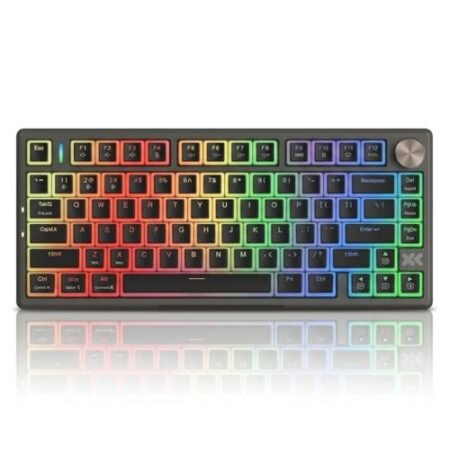
The physical control knob sits neatly in the upper right section for effortless volume shifts and display tweaks. Rotating the dial yields tactile clicks that make on-the-fly adjustments second nature.
Key spacing feels natural immediately, avoiding the cramped sensation found on smaller 60-percent deck styles. Dedicated arrow keys remain separated enough to prevent accidental key hits during fast navigation.
Side profile curvature follows natural hand ergonomics to minimize finger travel across key rows. Long typing sprints feel far less tiring thanks to the gentle step-sculpted key cap heights.
Overall frame rigidity feels remarkably solid with zero noticeable structural flex under heavy hand pressure. Plastic chassis materials resist flexing even when applying force near the center alpha keys.
See Current AULA Pricing
- Live Pricing: Find out exactly what this is selling for right now.
- Shipping Times: See how fast this can arrive at your front door.
- Stock Status: Make sure it is actually in stock before you make a decision.
Switch Options & Acoustic Gasket Mount
Underneath the keycaps lies a multi-layered sound deadening structure designed to isolate harsh bottom-out clack sound profiles. Five distinct padding layers absorb hollow casing reverberation before sound exits the housing.
Pre-lubricated mechanical switches glide smoothly down without any gritty spring friction on downstrokes. Modern guides on wireless mechanical keyboard selection factors emphasize internal foam density as a core driver of sound quality, and this board implements single-key PCB slotting specifically to cushion impacts.
Hot-swappable PCB sockets accept both 3-pin and 5-pin mechanical switch designs seamlessly. You can replace individual switches in minutes using the included metal puller tool.
The resulting acoustic tone lands firmly in the deep, muted thock spectrum prized by custom builders. Metallic ping noises are absent thanks to generous silicone pads tucked underneath the main plate.
Stabilizer bars on larger keys like the spacebar and shift keys come generously greased from the factory floor. Spacebar keystrokes land evenly without annoying wire rattle or uneven key wobble.
The dynamic spring return feels crisp enough for high-speed gaming macros without causing finger fatigue. Rapid double-taps register cleanly with quick actuation responses across every key position.
Keycap Quality & RGB Backlighting
Side-printed characters give the top surface a sleek, minimal look while keeping legend text protected from skin oil wear. Double-injection molding ensures the key legend lettering never fades or rubs smooth over years of constant friction.
The aula s98 pro wireless mechanical keyboard uses durable PBT plastic caps that resist shiny surface polish better than cheap ABS alternatives. Texture grips feel slightly textured, providing excellent control during fast-paced gaming rounds.
South-facing LED illumination casts light upward directly into the side-engraved key legends for sharp visibility. This orientation eliminates potential keycap binding issues if you swap in custom Cherry profile keycaps down the road.
Nineteen onboard lighting modes range from subtle static glow paths to reactive music rhythm illumination. You can change brightness levels and dynamic animation speeds straight from the top adjustment knob.
Front edge light bars throw a soft ambient glow down onto your desk pad surface. That extra accent lighting elevates the overall aesthetic without causing distracting screen reflections in dark rooms.
Custom GIF animations display brightly on the built-in LCD screen to show system stats or personal pixel art graphics. Screen brightness remains sharp and legible from standard seating angles during daytime hours.
Connectivity Speed & Battery Efficiency
Tri-mode connection support lets you jump between low-latency 2.4GHz wireless dongle mode, Bluetooth 5.0, and standard wired USB-C mode. Low wireless input latency ensures fast response times during competitive multiplayer matches.
A massive 5000mAh internal battery keeps the deck running through weeks of standard workplace usage between charging cycles. Turning off dynamic RGB illumination extends battery life even further during wireless operation.
The board stores up to five unique device pairings in memory for quick switching across work laptops and mobile devices. A quick turn of the control dial changes active host connections in seconds.
Power management enters low-power sleep mode after periods of inactivity to conserve internal energy reserves. Waking the board requires a single quick keystroke with virtually instant reconnection times.
Included USB-C cabling features durable shielding to handle wired play while topping off the battery. USB passthrough connections remain stable without dropping signal strength during active game sessions.
Wireless reception stays solid up to thirty feet away from the receiver dongle without dropping keystrokes. Obstructions like monitor arms do not interrupt signal transmission across crowded desks.
Real Limitations & Software Trade-Offs
Setting custom GIF images on the LCD screen requires installing Windows-specific companion software while using a physical wired connection cable. Mac users can still use basic screen info modes, but advanced custom display graphics remain locked behind Windows setup requirements.
The side-engraved keycaps look clean, but overhead room lighting can make key legends harder to read if backlighting is switched off. You will rely heavily on the south-facing LEDs to illuminate the legends during late night typing sessions.
Long-Term Value & Final Verdict
Feature density per dollar spent remains exceptionally high compared to mainstream brand offerings on the market. Between the hot-swappable PCB, gasket dampening design, and solid PBT caps, you get features normally reserved for custom custom keyboard kits.
Reliable triple connection options mean the aula s98 pro wireless mechanical keyboard adapts easily as your computing environment changes over time. Sturdy construction details protect internal components from daily wear and tear.
The verdict: This deck represents an incredible value for anyone wanting a feature-complete typing experience with custom acoustics straight out of the box. Small software quirks fade away once you experience the deep sound profile and solid wireless performance.
Frequently Asked Questions
Does the AULA S98 Pro work with Mac operating systems?
Yes, the keyboard connects via Bluetooth, 2.4GHz wireless, or USB-C cable to Mac systems cleanly. Basic typing and screen information functions work, though key remapping software requires Windows.
How do you upload custom GIF animations to the LCD screen?
You must connect the keyboard in wired USB mode to a Windows PC running official driver software. From the app interface, you can upload, edit, and flash animated GIFs onto the display.
What type of mechanical switches fit into this hot-swappable board?
The hot-swappable PCB sockets accommodate standard 3-pin and 5-pin mechanical switches. You can swap switches easily without soldering tools using the included puller device.
How long does the 5000mAh battery last on a single charge?
Battery life spans multiple weeks under regular typing conditions with backlighting turned off. Using continuous full-brightness RGB illumination reduces run times to roughly thirty to forty hours.
Can you control volume directly from the keyboard knob?
Yes, rotating the multi-function control knob adjusts system volume levels up or down smoothly. Pressing or turning the dial also lets you scroll through screen settings and lighting modes.
Are the keycaps easy to replace with third-party options?
Standard MX-style switch stems allow easy installation of most aftermarket Cherry or OEM profile keycap sets. South-facing LED placement prevents physical keycap interference when using alternative profile sets.
Does this keyboard produce a loud clicking typing noise?
No, internal five-layer sound dampening foam absorbs hollow casing noise to produce a muted, creamy sound. Keystrokes deliver a deep thock tone rather than a sharp high-pitched click.
Specifications
Ready to Upgrade Your Workspace?
9.3/10 Editor's Rating- Free Shipping: Eligible for fast and free delivery to your door
- Manufacturer Warranty: Backed by full brand support and coverage
- Flexible Returns: Shop with complete buyer protection and peace of mind
More Mechanical Keyboards Reviews