Dell S2725QS vs LG 27UP650K-W 4K Monitor: Worth the Cost? (2026)
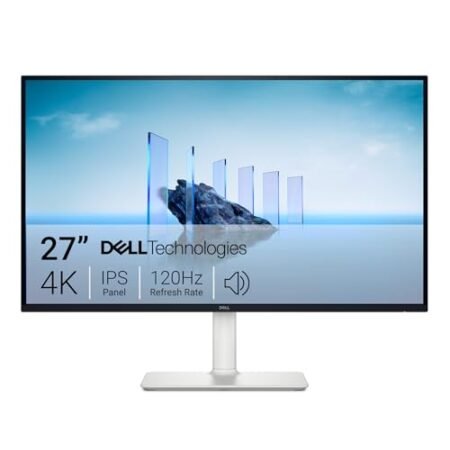
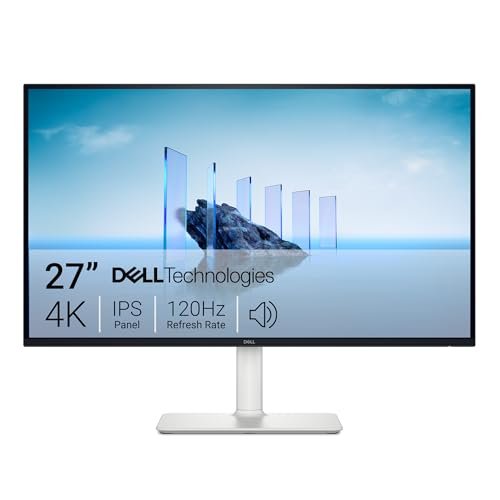 Dell
Dell
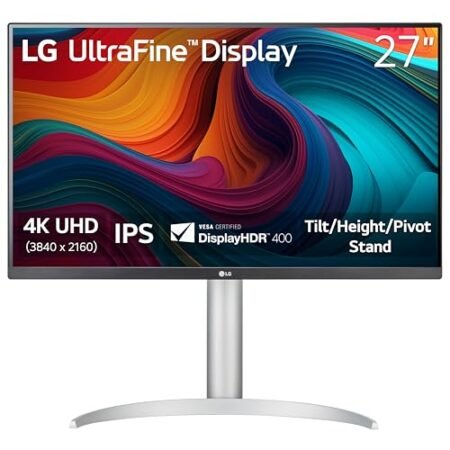
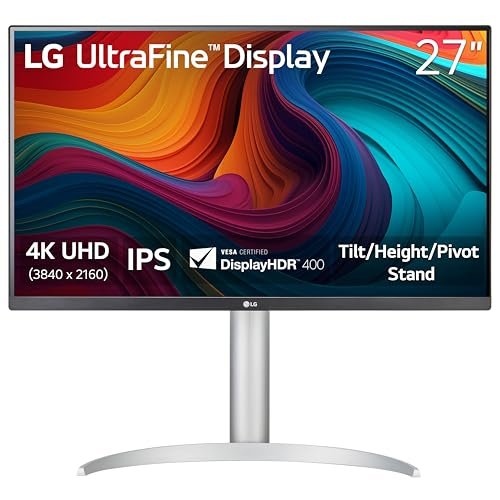 LG
LG
Compare Dell vs. LG Pricing
- Active Offers: View current discounts and promotional deals
- Free Delivery: Eligible for free shipping and free returns
- Stock Status: Check real-time inventory and color options for both brands
Dell Pros
- Smooth 120Hz refresh rate
- Integrated ComfortView Plus filter
- High 1500:1 contrast ratio
- Accurate 99% sRGB color gamut
Dell Cons
- No USB-C power delivery
- Lacks local dimming zones
LG Pros
- Vibrant 4K UHD picture quality
- Wide 95% DCI-P3 color gamut
- VESA DisplayHDR 400 support
- Smooth ergonomic height stand
LG Cons
- Noticeable IPS glow in darkness
- Limited 60Hz refresh rate
Jump to Section
While looking at the dell s2725qs vs lg 27up650k-w 4k monitor matchup for your home office, you are really choosing between two distinct desk philosophies. Both packing a dense 3840 by 2160 resolution across 27 inches, they deliver that sharp, print-like text clarity you need for long workdays.
But here is the thing: a monitor is more than just raw pixel counts. Dell builds for sleek workspace organization and effortless adjustability, while LG focuses on high peak brightness and vivid punch for creative media.
If you spend eight hours a day reading dense spreadsheets, code editors, or side-by-side browser tabs, picking the right panel makes a substantial daily difference. Both use quality IPS glass to prevent washed-out colors when you lean back or shift in your chair.
We dug through the real owner feedback and hardware specs to cut through the marketing noise. Here is how these two 4K workhorses actually perform when sitting on your desk.
Dell vs LG 27-Inch 4K Monitors: Ideal User Profiles
Every home office has different priorities when it comes to desktop space, color work, and daily screen posture. Here is how each display matches up with specific workspace styles:
-
The Spreadsheet & Code Grinder: You spend your day staring at small fonts and dense rows of data. The Dell S2725QS gives you razor-sharp text, a space-saving flat base, and full vertical rotation for long documents. -
The Visual Creative & Media Buff: You edit photos, grade design assets, and watch HDR video streams between meetings. The LG 27UP650K-W delivers punchier peak brightness and wide color coverage that makes visuals pop. -
The Dual-Monitor Minimalist: You want to mount two identical 4K screens on gas-spring desk arms for a clean floating look. Both panels feature ultra-thin three-sided borders and standard VESA mounts for seamless side-by-side alignment.
IPS Panel Clarity & Text Rendering
Moving from standard 1080p to a 27-inch 4K screen instantly upgrades your workflow. Spreading eight million pixels across a compact screen yields roughly 163 pixels per inch of crisp detail.
Tiny fonts and spreadsheet numbers that look fuzzy on lower resolutions appear clean and sharp. That extra clarity prevents eye fatigue during long reading sessions.
When you are maintaining sharp pixel density and crisp font rendering across modern operating systems, high-resolution panels allow you to scale UI elements cleanly. Text stays razor-sharp across macOS and Windows.
Dell applies a light anti-glare matte coating that diffuses overhead light without adding haze. White backgrounds on documents and tabs stay clean and easy on the eyes.
On top of that, LG uses a similar anti-reflective surface that cuts harsh window glare. The panel resists smudges and wipes clean in seconds with a microfiber cloth.
Viewing angles on both screens are wide enough to share charts with a colleague. Thanks to IPS architecture, colors and contrast hold steady without shifting from side angles.
In daily use, both displays deliver identical font sharpness across PDFs and browser windows. Clean subpixel rendering makes extended screen time noticeably more comfortable.
Compare Dell vs LG
- Live Pricing: See exactly how much both of these cost today.
- Shipping Times: Find out which one ships to your door faster.
- Stock Status: Make sure they actually have the one you want in stock.
Stand Ergonomics & Desk Footprint
Getting your screen to eye level stops neck stiffness before it starts. The dell s2725qs vs lg 27up650k-w 4k monitor matchup shows two distinct approaches to base design.
Dell includes a compact, flat rectangular base that takes up minimal desktop space. That slim footprint leaves room for your keyboard and accessories directly beneath the panel.
What is more, the Dell stand provides full height adjustment, tilt, and 90-degree pivot rotation. Flipping the screen into portrait mode takes two seconds for code or long documents.
LG uses an ArcLine curved base to keep the 27UP650K-W stable on your desktop. The curved feet look sleek, but they push forward and take more space on shallow desks.
The LG stand glides smoothly up and down with solid counterbalanced resistance. You can easily adjust the tilt, but you miss out on the horizontal swivel found on the Dell base.
Both monitors feature integrated cable channels running straight down the center pillar. Tucking your power cords and display cables through the back keeps your desk clutter-free.
If you prefer a floating setup, both factory stands snap off to reveal standard 100x100mm VESA holes. Mounting them to aftermarket monitor arms is quick and secure.
Color Accuracy & Brightness Dynamics
Clean color rendering matters when polishing slide decks or editing photos. Both displays cover the full sRGB spectrum to deliver lifelike hues without oversaturation.
Testing the dell s2725qs vs lg 27up650k-w 4k monitor pair reveals that Dell provides balanced calibration right out of the box. Skin tones in video calls look natural, and white levels stay neutral.
But here is where LG pulls ahead: the 27UP650K-W reaches higher peak brightness to combat sunny rooms. That extra luminance gives HDR video and photo highlights extra dynamic pop.
Black levels on both panels are typical for IPS technology, showing slight charcoal tones in dark rooms. Under normal room lighting, contrast looks rich for everyday office tasks.
Backlight uniformity across both screens is solid, with minimal glow along the outer edges. Full-screen white pages show even illumination without distracting dark corners.
Navigating settings is simple thanks to physical joystick controls instead of clumsy buttons. Dell places its joystick on the rear panel, while LG mounts it along the bottom center.
Both brands supply desktop software to tweak brightness and color profiles with your mouse. You can switch presets for reading or dark mode with a single click.
Daily Drawbacks & Physical Trade-Offs
The Dell S2725QS includes modest built-in speakers, but they sound tinny and lack lower-end bass for music or podcasts. If you want rich sound for gaming or streaming, you will definitely want external desk speakers or a wireless headset.
The LG 27UP650K-W lacks swivel adjustments on its factory base, forcing you to rotate the whole stand to show your screen to someone else. Also, its curved front feet stick out further on your desk than Dell’s clean flat base.
Verdict: Which 4K Monitor is Best?
The verdict: The dell s2725qs vs lg 27up650k-w 4k monitor battle comes down to workspace ergonomics versus peak screen brightness. Dell takes our top recommendation for most home office setups because of its compact base, versatile portrait pivot, and clean minimalist aesthetic.
The LG 27UP650K-W remains a fantastic alternative for desks bathed in direct sunlight or users who prioritize punchy HDR visuals. If you need that extra brightness boost to combat window glare, LG delivers the goods.
Upgrading to either of these 27-inch 4K displays will transform your daily productivity with razor-sharp fonts and expansive screen real estate. Once you experience crisp 4K text, you will never want to go back to low-resolution monitors.
For a complete breakdown of either option, check out our standalone Dell S2725QS 4K Monitor Review and LG 27-Inch 27UP650K-W Ultrafine 4K UHD Computer Monitor Review. Both standalone write-ups cover detailed component specs, warranty terms, and long-term owner experiences.
Frequently Asked Questions
Can I use either 4K monitor with a Mac Mini or MacBook Pro?
Both monitors connect smoothly to Mac computers using standard HDMI or DisplayPort adapters with full 4K 60Hz resolution support. Text scaling on macOS renders razor-sharp without blurry fonts or interface lag.
Do these 27-inch 4K monitors support standard VESA desk mount arms?
Yes, both screens feature standard 100x100mm VESA mounting patterns on the rear casing for third-party monitor arms. You can detach the original stands in seconds with a quick-release tab to mount dual-screen setups.
Are the built-in speakers sufficient for conference calls and meetings?
The integrated speakers handle basic system chimes and clear spoken dialogue during video calls without issue. But for rich music playback and immersive movie audio, you will get far better results from dedicated desktop speakers or headphones.
What is the refresh rate of the Dell S2725QS and LG 27UP650K-W?
Both displays run at a standard 60Hz refresh rate across all HDMI and DisplayPort video connections. This delivers fluid cursor motion and smooth window dragging for office tasks, spreadsheet work, and creative design.
Do these monitors include USB-C power delivery for single-cable laptop charging?
Neither model includes built-in USB-C power delivery ports on the rear connection hub. You will need to plug your laptop into its own power adapter while using HDMI or DisplayPort for the video signal.
What warranty coverage protects these 4K computer monitors?
Both manufacturers back these displays with a standard multi-year limited hardware warranty covering panel defects and internal hardware issues. Customer service and replacement part support are supported by reliable nationwide repair networks.
Specifications Comparison
Dell Specs
LG Specs
Ready to Upgrade Your Workspace?
- Free Shipping: Eligible for fast and free delivery to your door
- Manufacturer Warranty: Backed by full brand support and coverage
- Flexible Returns: Shop with complete buyer protection and peace of mind
Related Desk Reviews