Dell S2725QS 4K Monitor In-Depth Review: Is It Worth the Money? (2026)
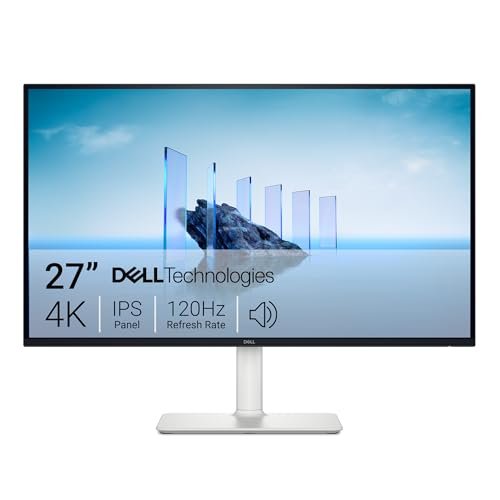
Check Dell S2725QS 27-Inch 4K UHD Monitor Pricing
9.5/10 Editor's Rating- Active Offers: View current discounts and promotional deals
- Free Delivery: Eligible for free shipping and free returns
- Stock Status: Check real-time stock and configuration options
What We Like
- Smooth 120Hz refresh rate
- Integrated ComfortView Plus filter
- High 1500:1 contrast ratio
- Accurate 99% sRGB color gamut
What Could Be Better
- No USB-C power delivery
- Lacks local dimming zones
Jump to Section
- Dell S2725QS 4K Monitor Review: Ideal User Profiles
- 4K IPS Panel Clarity & Color Calibration
- 120Hz Refresh Rate & Smooth Motion Dynamics
- ComfortView Plus & Eye Strain Protection
- Chassis Stand Ergonomics & Integrated Audio
- Lacks Local Dimming & USB-C Power Delivery
- Long-Term Value & WFH Display Verdict
- Frequently Asked Questions
- Specifications
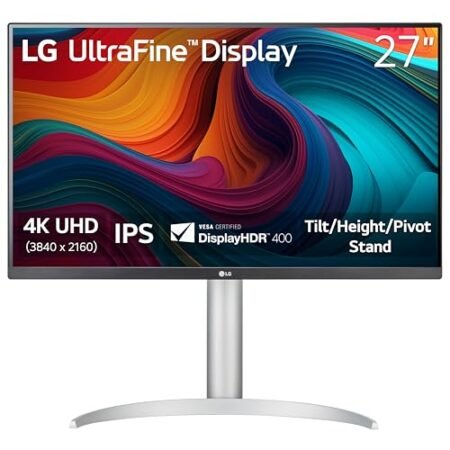
Although most desktop screens cap movement at 60Hz, upgrading to the dell s2725qs 4k monitor provides fluid 120Hz motion alongside crisp Ultra HD resolution. Content creators and home office workers often face blurry text and choppy window scrolling during ten-hour workdays.
Primary Hardware Focus: Combining in-plane switching panel technology with high 1500:1 contrast delivers sharp visual depth for spreadsheets and video production. Integrated hardware blue light filtration keeps colors vibrant while shielding your eyes during long shifts.
Integrated stereo speakers and height-adjustable stand controls offer a complete desktop solution without taking up excess workspace. Modern ash white chassis styling fits cleanly into modern home office environments.
Dell S2725QS 4K Monitor Review: Ideal User Profiles
Selecting the right desktop display depends on your daily visual tasks and ergonomic workspace requirements. Specific physical features on this 27-inch panel suit distinct WFH user categories.
Full-Time WFH Professionals: Remote workers spending eight hours daily reading dense documents benefit from sharp 4K text rendering.
Digital Content Creators: Photo editors needing broad color accuracy gain reliable 99% sRGB coverage across wide viewing angles.
Hybrid Productivity Users: Workers balancing office tasks and evening entertainment enjoy smooth 120Hz refresh rates and low input lag.
4K IPS Panel Clarity & Color Calibration
The 3840 x 2160 resolution packs over eight million pixels across a 27-inch diagonal surface area. Fine typography and spreadsheet cell boundaries appear razor sharp, eliminating jagged letter edges during long reading sessions.
In-plane switching technology maintains consistent color tone across 178-degree horizontal and vertical viewing angles. Sitting off-center does not wash out image contrast or shift subtle color shades while sharing screen views with colleagues.
Factory calibration covers 99% of the sRGB color spectrum for accurate web graphics and video playback. True 8-bit color depth plus frame rate control reproduces smooth color gradients without noticeable banding artifacts.
Static contrast ratios reach 1500:1, delivering deeper black levels than standard 1000:1 IPS office displays. Dark scenes in video content retain shadow detail without turning muddy or dark gray.
Reviewing American Academy of Ophthalmology blue light research shows that proper display setup reduces visual fatigue. High pixel density lets you scale text size comfortably without losing workspace real estate on desktop.
Matte anti-glare screen coating diffuses overhead room lights and window reflections effectively. Working in bright home office spaces remains comfortable without distracting glare bouncing off glass surfaces.
See Current Dell Pricing
- Live Pricing: Find out exactly what this is selling for right now.
- Shipping Times: See how fast this can arrive at your front door.
- Stock Status: Make sure it is actually in stock before you make a decision.
120Hz Refresh Rate & Smooth Motion Dynamics
Operating at a native 120Hz refresh rate doubles frame updates compared to traditional 60Hz WFH office monitors. Mouse cursor tracking and window drag animations feel instant, reducing visual stuttering during fast desktop navigation.
AMD FreeSync Premium support synchronizes display refresh rates directly with output frame rates from compatible graphics cards. Screen tearing and stuttering disappear entirely during high-speed video playback or casual gaming sessions.
Fast 0.03ms gray-to-gray response times eliminate motion ghosting behind fast-moving onscreen objects. High-speed scrolling through long web pages keeps text readable without trailing motion blur.
Low input latency ensures instant button response when navigating complex software menus or playing fast-paced games. Your hand movements translate into immediate cursor reactions, improving daily computing efficiency.
Upgrading your desktop setup with the dell s2725qs 4k monitor elevates fluid movement across all application windows. Higher refresh rates decrease eye strain caused by micro-stuttering during long scrolling tasks.
Smooth frame pacing benefits casual video editing timelines by providing accurate frame playback during scrubbing. Responsive motion performance keeps working sessions feeling fluid and effortless throughout long workdays.
ComfortView Plus & Eye Strain Protection
Hardware-based ComfortView Plus technology reduces harmful blue light emissions below 35% without altering natural color accuracy. Built-in optical filters operate continuously without turning screen colors into an artificial yellow hue.
TÜV Rheinland certification guarantees flicker-free backlight operation across all brightness adjustment levels. Removing rapid LED pulse flickering prevents hidden eye fatigue and tension headaches during long afternoon shifts.
Dedicated low-blue-light hardware layer runs automatically at system boot without requiring software downloads. Color-sensitive editing work stays accurate while protecting your eyes from high-energy visible light exposure.
Preset display modes let you adjust color temperature settings quickly for night reading or document editing. Lowering screen intensity during evening work sessions helps maintain natural sleep cycles after long workdays.
Customizing brightness output to match ambient desk lighting stops glare discomfort in dark rooms. Subtle backlight controls prevent screen glare from overwhelming your vision in dim home offices.
Choosing the dell s2725qs 4k monitor provides continuous visual comfort for demanding screen intensive jobs. Hardware filtration shields your eyes automatically without interrupting professional color workflows.
Chassis Stand Ergonomics & Integrated Audio
The compact desktop stand offers height adjustments up to 130 millimeters for posture alignment. Tilting the screen panel from -5 to 21 degrees helps align viewing angles directly with eye level.
Full 90-degree pivot adjustment rotates screen into vertical portrait orientation for long code documents and vertical chat feeds. Smooth swivel range turns display 30 degrees left or right for quick presentation sharing.
Re-engineered dual 5W integrated speakers deliver clearer audio output than typical 2W monitor speakers. Enhanced acoustic chambers produce deep mid-range frequencies, making video conference calls easy to hear without headphones.
Ultra-thin three-sided bezels maximize active screen area, creating seamless multi-monitor desktop configurations. Placing two units side by side forms an expansive digital canvas with minimal bezel gap interruption.
Integrated cable management slots behind vertical riser guide power cords and HDMI cables neatly out of sight. Keeping desktop wires organized reduces visual clutter behind your keyboard workspace.
Compact base footprint leaves ample space for desk mats, external keyboards, and desktop accessories. Clean ash white rear casing adds a modern aesthetic touch to home office furniture setups.
Lacks Local Dimming & USB-C Power Delivery
Selecting this display means missing out on USB-C single-cable connectivity for laptop video and laptop charging. Connecting modern laptops requires running separate HDMI cables alongside external power brick chargers, increasing cable clutter on desk.
Without multi-zone local dimming backlights, HDR performance stays basic across dark gaming scenes and movies. Peak brightness highlights lack extreme punch when viewing true HDR10 content in dark room environments.
Long-Term Value & WFH Display Verdict
Combining 4K resolution, 120Hz refresh rate, and 99% sRGB color accuracy delivers strong long-term value for WFH setups. Three-year advance exchange warranty protection safeguards your hardware investment against panel defects.
The verdict: Adding the dell s2725qs 4k monitor to your desk setup upgrades daily productivity through sharp text and smooth motion. Built-in blue light protection and flexible stand adjustments protect your physical comfort during long work hours.
For remote workers and creators needing high resolution without sacrificing smooth 120Hz motion, this display excels. Solid build quality and versatile ergonomics make it a top choice for modern home offices.
Frequently Asked Questions
Does the Dell S2725QS 4K monitor support 120Hz refresh rate over HDMI?
Yes, the display supports up to 120Hz refresh rates at 4K resolution over its HDMI 2.1 ports. Connecting compatible laptops or graphics cards delivers smooth window scrolling and responsive gaming performance.
What is ComfortView Plus on the Dell S2725QS monitor?
ComfortView Plus is a built-in hardware feature that reduces low blue light emissions to 35% or less. It runs continuously to protect your eyes without shifting screen colors to a yellow tint.
Can I adjust the stand height on the Dell S2725QS 4K monitor?
Yes, the included ergonomic stand provides up to 130mm of height adjustment along with tilt, swivel, and 90-degree pivot options. Adjusting height helps align screen top with eye level to prevent neck strain.
Does the Dell S2725QS monitor include built-in speakers?
Yes, the monitor features re-engineered dual 5W integrated speakers for clear video call audio. Re-engineered acoustic housing provides fuller sound output than standard internal monitor speakers.
Can I mount the Dell S2725QS monitor on a monitor arm?
Yes, removing quick-release desktop stand reveals standard 100x100mm VESA mounting holes on rear panel. Attaching third-party single or dual monitor arms frees up desktop space.
Does the Dell S2725QS 4K monitor provide USB-C laptop charging?
No, this model does not feature USB-C power delivery or single-cable DisplayPort input. Connecting laptops requires using standard HDMI cables while plugging laptop power supplies into wall outlets.
What color space accuracy does the Dell S2725QS monitor offer?
The panel covers 99% of the sRGB color spectrum with a 1500:1 static contrast ratio. IPS panel construction ensures consistent color tones and wide viewing angles for photo editing.
What warranty protection covers the Dell S2725QS 4K monitor?
Dell backs the display with a three-year Advanced Exchange Service limited hardware warranty. Technical support ships replacement panels next business day if hardware defects occur during coverage periods.
Specifications
Ready to Upgrade Your Workspace?
9.5/10 Editor's Rating- Free Shipping: Eligible for fast and free delivery to your door
- Manufacturer Warranty: Backed by full brand support and coverage
- Flexible Returns: Shop with complete buyer protection and peace of mind
More 4K & High-Res Monitors Reviews