PHILIPS Ergonomic Wireless Mouse In-Depth Review: Our Honest Opinion (2026)
Check PHILIPS Ergonomic Wireless Mouse Pricing
9/10 Editor's Rating- Active Offers: View current discounts and promotional deals
- Free Delivery: Eligible for free shipping and free returns
- Stock Status: Check real-time stock and configuration options
What We Like
- Dual 2.4G USB-A/C receiver included
- Library-quiet main click switches
- Dedicated horizontal thumb scroll wheel
- Five-stage adjustable optical DPI
What Could Be Better
- Strict right-handed shell design
- Slightly light thumb wheel resistance
Jump to Section
- Philips Multi-Device Peripheral: Ideal User Profiles
- Ergonomic Shell Dynamics & Wrist Physiology
- Dual Scroll Mechanics & Software Customization
- Multi-Host Wireless Sync & Receiver Hardware
- Optical Sensor Tracking & Power Reserve Systems
- Physical Limitations & Ergonomic Trade-offs
- Long-Term Value & Final Verdict
- Frequently Asked Questions
- Specifications
If persistent wrist pronation causes strain during long spreadsheet sessions, investing in the philips ergonomic wireless mouse helps restore neutral forearm posture. This specialized peripheral features an asymmetrical right-handed body sculpted to relieve tension along the median nerve.
Dual wireless connectivity pairs quickly via Bluetooth or the included combined USB-A and USB-C receiver. Optical sensor settings adjust on the fly from 800 up to 4000 DPI across various office surfaces.
Why it stands out: An integrated thumb scroll wheel enables horizontal navigation alongside silent primary click switches. Multi-device pairing syncs up to three hardware platforms simultaneously to streamline complex workstation workflows.
Philips Multi-Device Peripheral: Ideal User Profiles
Matching peripheral specs to specific workflow demands ensures proper wrist comfort and interface efficiency. The following user groups benefit most from this contoured hardware setup.
- Spreadsheet Heavyweights: Data analysts who require immediate side-scrolling capabilities without dragging scrollbars manually across wide data grids.
- Multi-Device Power Users: Professionals switching fluidly between personal laptops, office desktops, and tablet displays using single-button hardware controls.
- Open-Office Workers: Shared space employees needing near-silent switch actuation during active video calls or quiet library settings.
Ergonomic Shell Dynamics & Wrist Physiology
The philips ergonomic wireless mouse features a sculpted outer shell that supports natural palm alignment while keeping fingers relaxed over primary actuators. Extended side flaring prevents the pinky finger and thumb from dragging along desk surfaces during rapid movements.
A steep lateral slope rotates the hand outward to reduce muscular tightness across the forearm. This natural angle encourages movement from the elbow rather than forcing tight wrist bending.
Recent industry research regarding workstation setups details 3 reasons you should use an ergonomic mouse before it's too late to prevent long-term strain injuries. Upgrading to a contoured layout shifts physical pressure away from sensitive nerve pathways.
Textured rubber surfacing along the thumb rest improves control without requiring tight grip pressure. Users maintain steady pointer accuracy while relaxing hand muscles throughout full eight-hour work shifts.
Lightweight chassis materials keep overall mass low to minimize exertion during sweeping cursor motions. The balanced weight distribution stops the rear section from tipping back during quick lifts.
Silent switch mechanics under the left and right buttons dampen acoustic feedback completely. Soft internal dampeners cushion bottom-out impacts to lower finger joint fatigue during repetitive clicking tasks.
See Current PHILIPS Pricing
- Live Pricing: Find out exactly what this is selling for right now.
- Shipping Times: See how fast this can arrive at your front door.
- Stock Status: Make sure it is actually in stock before you make a decision.
Dual Scroll Mechanics & Software Customization
The primary scroll wheel offers tactile steps for precise document control and line-by-line navigation. Internal encoder detents prevent accidental free-spinning when scrolling through lengthy PDF files.
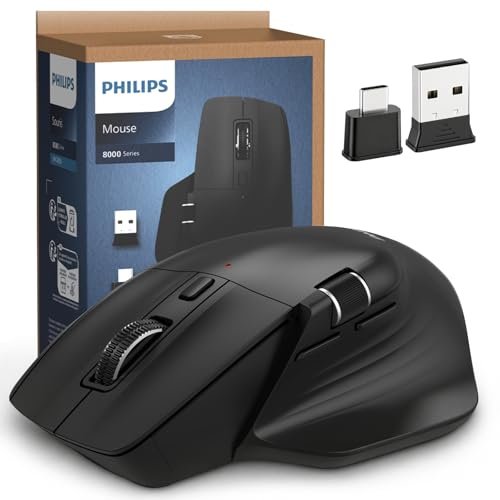
A secondary horizontal wheel sits directly above the thumb rest for natural lateral scrolling access. Data entry operators can navigate wide spreadsheets without moving the main cursor to bottom scrollbars.
Dedicated side navigation keys handle forward and backward commands right under thumb reach. These secondary switches give quick browser navigation without interrupting typing rhythm.
Custom software integration lets users assign specific macro commands and shortcut key combinations to extra buttons. Rebinding middle-click functions creates custom control shortcuts tailored to individual software preferences.
Smooth scroll resistance across both wheels allows fast flicks or precise micro-adjustments depending on rotation speed. Index finger strain decreases since navigation burden divides across two separate control wheels.
Button actuation force sits at an optimal baseline to prevent misclicks while resting fingers lightly. The responsive tactile reset lets users register double clicks cleanly without firm finger pressure.
Multi-Host Wireless Sync & Receiver Hardware
Operating the philips ergonomic wireless mouse across multiple systems relies on a dual-headed wireless dongle that integrates USB-A and USB-C connectors into one compact housing unit. Laptop users gain immediate plug-and-play access without buying separate expansion hubs or dongles.
Bluetooth channels allow clean connections to tablets, laptops, and smart displays without occupying USB ports. Transitioning between saved wireless channels takes one button press on the underside housing.
Signal transmission operates on secure 2.4GHz bands to maintain steady pointer response in crowded Wi-Fi environments. Low-latency transmission prevents frustrating cursor stutter during fast screen movements.
Multi-device memory stores three active pairings for instantaneous switching across operating systems. Windows, macOS, and iPadOS devices recognize input layouts instantly without requiring software resets.
Internal storage slots inside the battery compartment secure the wireless receiver during travel. Magnetic latching holds the dongle firmly so small components do not get lost inside gear bags.
Wireless range reaches up to ten meters clear line-of-sight for presentations or remote desk setups. Signal stability stays consistent even when operating through thick office desk partitions.
Optical Sensor Tracking & Power Reserve Systems
An advanced optical tracking sensor renders smooth motion across clear glass, polished wood, and standard mouse pads. Integrated surface tracking adjusts LED intensity automatically to conserve battery reserves on bright tops.
On-the-fly DPI controls cycle between 800, 1200, 1600, 2400, and 4000 DPI resolutions with a single top button. Users switch quickly from slow precision editing modes to high-speed multi-monitor panning modes.
The internal 500mAh lithium-ion battery supports up to twenty-five working days under normal daily operational use. Automatic sleep power modes trigger after brief inactivity to stop unnecessary power drain overnight.
An emergency five-minute quick charge feature provides roughly one full hour of continuous tracking capability. Connecting the included Type-C charging cable restores operational power fast during critical video meetings.
Front-facing USB-C port placement lets users operate the peripheral while wired without blocking smooth movements. Flexible cable wrapping reduces desk friction while topping up battery power during active work sessions.
Top-mounted status LED indicators display current DPI settings and warn when battery reserves run low. Clear lighting patterns give immediate notice before power drops completely during long work sessions.
Physical Limitations & Ergonomic Trade-offs
The heavily sculpted right-handed design completely excludes left-handed users from using this frame comfortably. Ambidextrous desktop setups require alternative symmetric pointer hardware to accommodate left-dominant grips.
Users with smaller hands might find reaching the forward side thumb button requires slight grip adjustments. The thumb wheel scroll tension also feels slightly loose for users preferring firm mechanical clicks.
Long-Term Value & Final Verdict
High-grade ABS construction and durable micro-switches protect key internal components against daily wear. Low maintenance demands combined with multi-device pairing create solid productivity gains across daily digital tasks.
Replacing traditional battery swaps with rechargeable lithium power lowers total owner overhead over several years. Versatile USB-A and USB-C dongle options prevent extra accessory costs when upgrading mobile laptop setups.
The verdict: The philips ergonomic wireless mouse offers exceptional comfort, silent clicks, and dual-wheel versatility for modern office workflows. Balanced physical support and multi-host connectivity make it an outstanding ergonomic upgrade for multi-screen productivity setups.
Frequently Asked Questions
How do you switch between Bluetooth and 2.4GHz wireless modes?
A mode button located on the bottom of the mouse cycles through channel profiles. Status indicators show whether the active connection uses the wireless receiver or Bluetooth channels.
Can the thumb wheel perform vertical scrolling instead?
Software customization options let users rebind scroll axes to match individual application demands. Default settings automatically bind the thumb wheel to horizontal panning across wide documents.
Does the optical sensor work on glass desk surfaces?
The high-resolution optical sensor tracks accurately on semi-reflective glass surfaces thicker than four millimeters. Standard mouse pads still offer optimal tracking consistency and smooth glide control.
Does the mouse charge while in active use?
Plugging the USB-C cable into a powered port recharges the battery during active desktop use. Motion tracking remains fully functional throughout the charging process.
How long does a full battery charge last?
The built-in 500mAh battery delivers roughly twenty-five working days based on an eight-hour daily workload. Auto-sleep modes help conserve power during short idle periods.
Is this mouse compatible with Mac computers?
Full compatibility extends to macOS via Bluetooth and the included dual USB-A/C wireless receiver. Side navigation buttons function natively across Finder and major Mac web browsers.
How quiet are the main button switches?
Special dampened internal switches lower switch actuation noise by over ninety percent compared to standard mice. Primary buttons remain nearly silent inside quiet library settings or open office spaces.
What is the overall weight of this ergonomic mouse?
The mouse weighs approximately 0.21 pounds to balance effortless movement with solid desktop stability. Lightweight structural housing minimizes hand strain during sweeping cursor movements.