UGREEN Vertical Mouse Definitive Review: The Honest Truth (2026)
Check UGREEN Vertical Mouse Pricing
8.2/10 Editor's Rating- Active Offers: View current discounts and promotional deals
- Free Delivery: Eligible for free shipping and free returns
- Stock Status: Check real-time stock and configuration options
What We Like
- Natural vertical handshake angle
- Quiet silent-click primary buttons
- Versatile dual Bluetooth and 2.4G connection
- Budget-friendly ergonomic workstation upgrade
What Could Be Better
- Requires single AA battery replacement
- Lacks programmable side button software
Jump to Section
- UGREEN Vertical Wireless Pointer: Ideal User Profiles
- Ergonomic Handshake Shape & Wrist Strain Relief
- Dual Connectivity & Battery Efficiency
- Tracking Precision & Silent Switch Dynamics
- Button Configuration & System Compatibility
- Negative Flaws & Limitations
- Long-Term Value & Verdict
- Frequently Asked Questions
- Specifications
After six months of constant daily computer use, upgrading to a 4.72-inch long ugreen vertical mouse can save your forearm muscles from chronic stress without draining your office equipment budget. Working long desk sessions often leads to repetitive strain injury, making an affordable posture correction tool a high-return investment.
Why it stands out: This ergonomic pointer swaps traditional flat desk navigation for a vertical posture that instantly releases wrist pressure. Its budget-friendly design lowers the barrier to entry for health-focused office upgrades.
Spending money on preventive desktop tools pays off by reducing missed work hours and costly physical therapy appointments. The ugreen vertical mouse delivers essential neutral positioning at a fraction of premium brand costs.
UGREEN Vertical Wireless Pointer: Ideal User Profiles
Selecting the correct ergonomic peripheral depends entirely on your daily computer habits and physical office setup. Understanding your primary tasks helps determine whether this affordable handshake layout yields maximum health returns.
- Active Remote Workers: Professionals spending eight or more hours daily in spreadsheets benefit from the pressure-relieving handshake angle.
- Shared Workspace Professionals: Workers in open office environments appreciate the near-silent switch action on main buttons.
- Multi-Device Managers: Power users switching between laptops and tablets gain speed through dual-mode wireless pairing.
Ergonomic Handshake Shape & Wrist Strain Relief
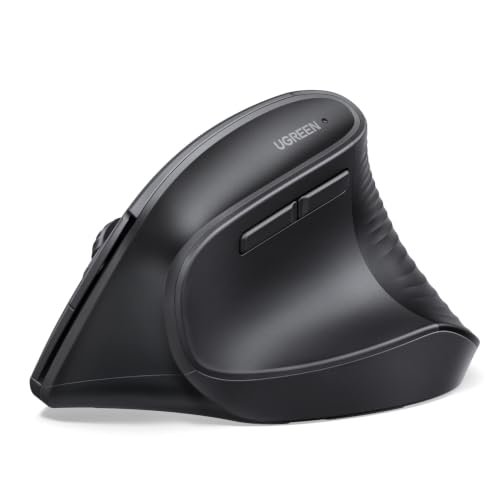
Sitting through continuous eight-hour shifts causes standard flat mice to force your forearm bones into an unnatural twist. This vertical shell supports a natural handshake grip that relieves muscle tension immediately upon placing your palm over the body.
The 3.38-inch width gives ample surface area for larger hands to rest without dragging fingers across your desk surface. Such full-palm support prevents calluses and lowers localized friction points throughout long typing sessions.
Research into workstation health shows that tilting your hand upright lowers carpal tunnel pressure significantly over extended shifts. Before making the switch, reviewing whether is a vertical mouse right for you can help set realistic expectations for your daily workflow.
Transitioning from a flat mouse typically takes three to five days of active muscle adaptation. Once your hand learns the balance, muscle memory takes over and thumb strain drops noticeably.
The sculpted thumb rest keeps your lowest digit elevated off the mousepad to prevent drag. This intentional contour prevents pinching along the base of your joint during rapid diagonal swipes.
Investing small amounts into proper wrist alignment yields substantial compound savings on medical interventions later in your career. High daily comfort ensures you remain productive without experiencing late-afternoon forearm fatigue.
See Current UGREEN Pricing
- Live Pricing: Find out exactly what this is selling for right now.
- Shipping Times: See how fast this can arrive at your front door.
- Stock Status: Make sure it is actually in stock before you make a decision.
Dual Connectivity & Battery Efficiency
Managing multiple devices becomes seamless when your primary pointer bridges desktop and mobile operating systems effortlessly. This peripheral offers both a 2.4GHz USB dongle and Bluetooth modes to switch between three separate hardware setups instantly.
Switching between a primary work laptop and a personal tablet requires only a single button press on the underside. Eliminating extra cables creates a clean workspace while saving you from purchasing duplicate accessories.
Powering the internal board with a single AA battery avoids the long-term lithium degradation seen in sealed rechargeable units. When energy runs out, swapping in a fresh cell takes five seconds and restores full function without tethered charging delays.
An automatic smart sleep mode cuts power consumption during prolonged periods of workstation inactivity. Leaving the unit powered on overnight won’t drain your battery prematurely thanks to this background power management.
Operational ranges extending up to ten meters provide strong wireless signals across large conference rooms or home offices. You can lead slideshows or control media setups from across the room without losing tracking signal.
Lower hardware maintenance costs directly boost the overall financial ROI of your daily workstation tools. Reliable battery longevity ensures continuous workflow continuity without unexpected dead-battery delays.
Tracking Precision & Silent Switch Dynamics
Working inside quiet open-plan offices or late-night home spaces requires whisper-quiet peripheral switch selection. The primary left and right click buttons execute soft tactile feedback without generating sharp acoustic clicks.
Coworkers sitting nearby won’t be distracted during intense research or rapid document navigation. This reduced noise profile creates a peaceful environment for deep focus tasks.
Sensor resolution adjusts across four discrete levels, offering 1000, 1600, 2000, and 4000 DPI settings. Toggling these speeds allows you to match pointer sensitivity to multi-monitor arrangements or tight spreadsheet editing.
Lower DPI settings give precise pixel-level accuracy for photo cropping or design mockups. Higher settings allow sweeping cursor movements across dual 4K monitors with minimal physical hand movement.
Bottom-mounted PTFE glide pads ensure low-friction gliding across fabric pads, bare wood, or plastic laminate surfaces. Smooth footings prevent jerky tracking inputs and lower the physical effort required to push the 0.37-pound chassis.
Combining quiet performance with adaptable tracking speed makes this unit an efficient asset for varied computer workloads. High tracking efficiency means fewer repetitive wrist flicks to move across large display screens.
Button Configuration & System Compatibility
Navigation speed improves when core browser shortcuts sit right under your thumb. The integrated five-button layout includes dedicated forward and backward buttons placed conveniently along the upper thumb groove.
Skipping manual cursor trips to screen navigation arrows saves time over thousands of web pages weekly. These physical shortcuts keep your focus centered on content reading rather than window management.
Broad operating system support covers Windows, macOS, Linux, ChromeOS, and Android platforms natively. You can move the device across diverse hardware environments without installing bloatware drivers.
Plug-and-play architecture guarantees immediate peripheral recognition as soon as you connect the USB receiver. Standard driver integration prevents IT administration lockouts on restricted corporate laptops.
MacOS users can easily map secondary side buttons using native system settings or lightweight third-party utilities. Universal broad compatibility protects your device investment even if your employer switches software ecosystems.
Cross-platform reliability ensures your ergonomic hardware continues to deliver value through future office equipment upgrades. Versatile button options streamline daily tasks without forcing you to memorize complex software routines.
Negative Flaws & Limitations
Relying on replaceable AA batteries instead of built-in USB-C recharging may feel outdated for users preferring cable charging. You must keep spare batteries inside your desk drawer to avoid sudden workflow interruptions when power drains.
The lack of dedicated configuration software means side buttons cannot be rebound to custom macros natively. Power users seeking complex key combinations or game-specific button mappings may find the static five-button layout restrictive.
Long-Term Value & Verdict
Calculating the total cost of ownership reveals exceptional value for professionals seeking affordable wrist health protection. This unit delivers essential ergonomic geometry and multi-device wireless pairing at a small fraction of competing flagship prices.
Durable PTFE feet and solid plastic casing ensure long-lasting utility across years of daily office work. Low upfront investment risk makes it an ideal testing ground for anyone curious about vertical mice.
The verdict: The ugreen vertical mouse provides an outstanding balance of ergonomic strain relief, quiet operation, and flexible connectivity for budget-minded workers. Investing in this posture-correcting pointer pays immediate dividends in daily physical comfort and long-term joint health.
Frequently Asked Questions
Does the UGREEN vertical mouse require driver installation?
No, this mouse operates as a plug-and-play device across all compatible operating systems. You simply plug in the USB receiver or pair via Bluetooth to begin working immediately.
How long does a single AA battery last in this vertical mouse?
A standard AA battery can power the device for several months under normal office use. The automatic smart sleep mode helps conserve energy whenever the mouse sits idle.
Is the UGREEN vertical mouse suitable for left-handed users?
This model features an asymmetrical body sculpted specifically for right-handed use. Left-handed users will find the thumb rest and side buttons unreachable in daily operation.
How do you switch between Bluetooth and 2.4GHz wireless modes?
Mode selection is managed via a dedicated toggle button located on the bottom of the mouse. Pressing the button cycles instantly between the USB receiver and paired Bluetooth devices.
Does this mouse work smoothly on glass desk surfaces?
Optical tracking performs best on opaque surfaces like fabric mousepads or wood desktops. Clear glass desks may impair tracking precision, so a standard desk mat is recommended.
Can you adjust button mappings on macOS natively?
Primary mouse buttons work out of the box, but side buttons require native macOS system setting tweaks. Third-party utility software can also remap navigation buttons if needed.
Specifications
Ready to Upgrade Your Workspace?
8.2/10 Editor's Rating- Free Shipping: Eligible for fast and free delivery to your door
- Manufacturer Warranty: Backed by full brand support and coverage
- Flexible Returns: Shop with complete buyer protection and peace of mind