KTC 120HZ 32-Inch Computer Monitor In-Depth Review: Is It Worth the Money? (2026)
Check KTC 120HZ 32-Inch Computer Monitor Pricing
9/10 Editor's Rating- Active Offers: View current discounts and promotional deals
- Free Delivery: Eligible for free shipping and free returns
- Stock Status: Check real-time stock and configuration options
What We Like
- Large 32-inch QHD 1440p resolution display
- Smooth 120Hz refresh rate motion handling
- Flicker-free panel with low blue light filter
- Universal 100x100mm VESA mounting plate support
What Could Be Better
- Included tilt-only stand lacks height adjustment
- Lacks built-in internal audio speakers
Jump to Section
- KTC 32-Inch QHD Display Review: Ideal User Profiles
- KTC Panel Frame & Thin Bezel Structural Mechanics
- 120Hz Motion Smoothness & Gaming Sync Response
- Visual Comfort & Recommended Screen Viewing Distance
- Stand Ergonomics & Internal Speaker Omission Flaws
- Long-Term Value & Final Recommendation
- Frequently Asked Questions
- Specifications
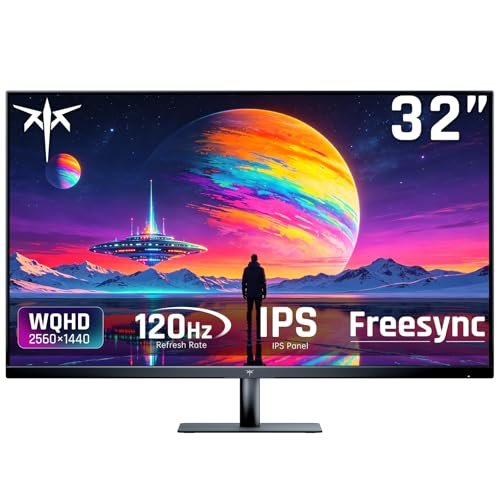
Upgrading your primary desktop screen during a 12-hour work and gaming shift requires balancing sharp visual detail with comfortable viewing dimensions; the ktc 120hz 32-inch computer monitor delivers 1440p QHD clarity across a wide display area. Many desktop users assume 32-inch displays require 4K resolutions to look sharp, yet 2560×1440 pixel density keeps text crisp and system rendering fast.
Inspecting the panel specifications shows flicker-free backlight control alongside integrated low blue light modes to preserve eye comfort. Pairing a smooth 120Hz refresh rate with QHD resolution keeps fast motion fluid during work and gaming.
Primary monitor takeaway: Combining slim bezel styling with multiple video input ports makes this large monitor a versatile centerpiece for modern desks. Standard VESA mounting compatibility allows easy attachment to desk arms for improved ergonomics.
KTC 32-Inch QHD Display Review: Ideal User Profiles
Determining if a 32-inch monitor matches your desk space depends on your primary software applications and seating distance. Large panel dimensions benefit specific multitasking workflows and gaming setups.
Multi-Window Productivity Workers: Professionals who arrange spreadsheets and browser windows side by side without needing dual monitor arms.
Casual & High-FPS Gamers: Players seeking fluid 120Hz refresh rates with Adaptive Sync tear-free performance for action titles.
Media & Video Streamers: Viewers wanting 1.07 billion color depth and HDR10 support for movie playback and video editing.
KTC Panel Frame & Thin Bezel Structural Mechanics
The monitor frame features ultra-thin side and top bezels to maximize screen space across your desk layout. Positioning the ktc 120hz 32-inch computer monitor on a deep desk setup expands your visual workspace without overcrowding desktop peripherals.
Durable polymer housing surrounds the display panel to keep overall weight light for arm mounting. Smooth matte black finishes prevent distracting reflections under bright office lighting.
Multiple input ports including HDMI, DisplayPort, and Mini DisplayPort allow quick switching between computers and gaming consoles. Connecting several devices simultaneously keeps your workstation tidy and versatile.
Standard 100x100mm VESA mounting holes built into the rear chassis support aftermarket monitor arms and wall brackets. Removing the stock desktop base unlocks full height, swivel, and pivot adjustments.
Ventilation slots along the upper rear casing allow passive heat dissipation during long gaming sessions. Internal components stay cool to maintain reliable operation across hot summer months.
The clean rear panel design conceals cable connection points to keep desktop wiring neat. Integrated cable clip channels help route power and video cords down the back of your setup.
See Current KTC Pricing
- Live Pricing: Find out exactly what this is selling for right now.
- Shipping Times: See how fast this can arrive at your front door.
- Stock Status: Make sure it is actually in stock before you make a decision.
120Hz Motion Smoothness & Gaming Sync Response
A fast 120Hz refresh rate delivers smooth frame transitions during rapid camera sweeps in action games. Doubling standard 60Hz frame output reduces motion blur and ghosting artifacts during fast gameplay.
FreeSync and G-Sync compatibility synchronizes panel refresh rates with your graphics card frame output. Variable refresh rate technology eliminates screen tearing and stuttering during demanding graphics scenes.
Five built-in display presets optimize brightness, contrast, and color balance for gaming, movies, web browsing, and text editing. Toggling preset modes lets you quickly adapt display settings for different software applications.
HDR10 signal decoding expands dynamic range to highlight shadow details in dark game environments. High dynamic range processing deepens black levels while keeping bright highlights vivid.
Displaying 1.07 billion color shades creates smooth gradients without noticeable banding in sky or gradient graphics. Rich color depth ensures photo editing and movie viewing remain vibrant.
Low input lag response guarantees instant cursor and character movement when moving your mouse or gamepad. Immediate input feedback improves control precision during competitive gaming matches.
Visual Comfort & Recommended Screen Viewing Distance
Flicker-free direct current backlighting eliminates subtle screen flickering that triggers headaches during long workdays. Setting up the ktc 120hz 32-inch computer monitor at a proper distance ensures comfortable viewing without straining your neck muscles.
Following research on computer screen ergonomics, calculating your ideal monitor viewing distance helps prevent eye strain and neck fatigue when using 32-inch displays. Maintaining roughly 24 to 30 inches of screen distance supports natural eye comfort.
Selectable low blue light filtering reduces harsh short-wavelength blue light emissions during late-night work sessions. Softening blue light tones helps maintain natural sleep cycles when working late into the evening.
Anti-glare screen coating diffuses ambient window reflections to preserve image clarity in bright rooms. The matte panel surface prevents distracting light reflections from overhead office lights.
Wide 178-degree viewing angles maintain consistent color and contrast when viewing the screen from side angles. Color accuracy remains stable whether sitting centered or sharing screen views with colleagues.
QHD 2560×1440 resolution provides ample desktop real estate for open windows without needing font scaling adjustments. Crisp text rendering keeps documents readable during extended research sessions.
Stand Ergonomics & Internal Speaker Omission Flaws
The included desktop stand offers basic forward and backward tilt adjustments but lacks height, swivel, or pivot controls. Users needing vertical height adjustments will need to purchase a VESA monitor arm or desktop riser stand.
The monitor lacks built-in internal speakers requiring users to rely on external desktop speakers or headphones for audio output. Connecting external sound gear adds an extra cable connection to your desktop setup.
Long-Term Value & Final Recommendation
Choosing the ktc 120hz 32-inch computer monitor gives desktop users a versatile display panel for work and gaming without breaking your budget. Sharp 1440p resolution combined with 120Hz motion smoothness delivers great daily utility.
Energy-efficient LED backlighting paired with robust VESA mounting support ensures long-lasting value across changing desk setups. Dependable panel construction provides consistent visual performance over years of heavy daily use.
Final recommendation: This 32-inch display represents a solid purchase for anyone seeking expansive QHD desktop space and fluid 120Hz refresh rates. If you plan to use a VESA arm and external speakers, this monitor offers excellent performance.
Frequently Asked Questions
Does the KTC 32-inch monitor support 1440p resolution at 120Hz?
Yes, the monitor supports 2560×1440 QHD resolution up to a smooth 120Hz refresh rate via DisplayPort and HDMI inputs. This provides crisp text and fluid motion for gaming and work.
Can I mount this 32-inch monitor on a standard monitor arm?
Yes, the rear panel features standard 100x100mm VESA mounting holes for easy attachment to desk arms or wall mounts. Removing the stock stand reveals the mounting plate.
Does this monitor include built-in speakers?
No, this monitor does not have internal speakers. You will need to connect external desktop speakers, a soundbar, or headphones to your computer for audio.
Is this monitor compatible with Nvidia G-Sync and AMD FreeSync?
Yes, the monitor supports Adaptive Sync technology compatible with both AMD FreeSync and Nvidia G-Sync. Variable refresh rate eliminates screen tearing during gaming.
Does the monitor stand feature height adjustment?
The stock desktop stand only offers basic tilt angle adjustment. If you require height or swivel adjustments, mounting the panel on a VESA monitor arm is recommended.
What video inputs are available on the back panel?
The monitor includes HDMI, DisplayPort, and Mini DisplayPort inputs to connect desktop PCs, laptops, and gaming consoles. Input selection can be toggled through the menu buttons.
Does the screen feature anti-glare coating?
Yes, the display panel features a matte anti-glare finish that diffuses reflections from windows and overhead lighting. This coating helps maintain clear visibility in bright rooms.
What warranty coverage and long-term value does this monitor offer?
The monitor includes standard manufacturer defect warranty protection for your purchase. Given its large QHD screen size, 120Hz refresh rate, and VESA support, it delivers strong long-term value.
Specifications
Ready to Upgrade Your Workspace?
9/10 Editor's Rating- Free Shipping: Eligible for fast and free delivery to your door
- Manufacturer Warranty: Backed by full brand support and coverage
- Flexible Returns: Shop with complete buyer protection and peace of mind
More Gaming Monitors Reviews