KTC 220Hz 27-Inch Gaming Monitor Definitive Review: Is It Worth the Money? (2026)
Check KTC 220HZ 27-Inch Gaming Monitor Pricing
8.5/10 Editor's Rating- Active Offers: View current discounts and promotional deals
- Free Delivery: Eligible for free shipping and free returns
- Stock Status: Check real-time stock and configuration options
What We Like
- 220Hz refresh rate on DisplayPort
- Fast 1ms pixel response time
- Rich 131% sRGB Fast IPS colors
- VESA 100x100mm mounting support
What Could Be Better
- Stock stand only offers basic tilt
- No built-in internal speakers
Jump to Section
- KTC 27-Inch 1440P Display Review: Ideal User Profiles
- Refresh Rate & Frame Transition Mechanics
- Panel Response Time & Input Latency
- Color Accuracy & HDR Performance
- Stand Ergonomics & Mounting Options
- Physical Limitations & Stand Restrictions
- Long-Term Value & Verdict
- Frequently Asked Questions
- Specifications
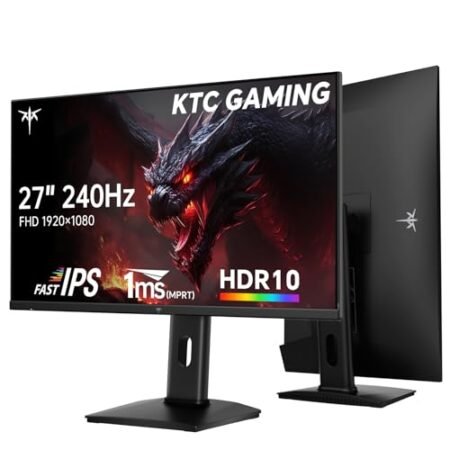
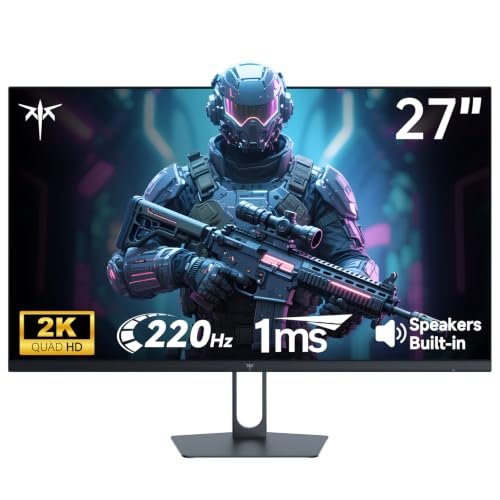
A high-pitched coil whine or subtle electrical hum from an old display ruins focus faster than a lagging internet connection. Setting up the ktc 220hz 27-inch gaming monitor replaces that outdated gear with a smooth 2560×1440 Fast IPS panel running at up to 220 frames per second.
Targeting competitive frame rates, this panel pairs a rapid 1ms response speed with dynamic backlight control across a 27-inch canvas. Switching from a standard 60Hz screen to this high-refresh display feels like moving from a stuttering commuter train to a silent magnetic rail.
High refresh speed meets crisp resolution, giving fast-paced shooters and twitch action games incredible visual fluidity. It delivers clean frame transitions without forcing you into expensive top-tier flagship price brackets.
KTC 27-Inch 1440P Display Review: Ideal User Profiles
Deciding on a high-speed display requires matching your GPU capabilities and daily screen time with the right panel specs. Here are the three primary setup profiles that benefit most from this high-refresh Fast IPS display:
Competitive Shooter Players: Gamers needing high frame rates up to 220Hz and 1ms motion clarity to track fast targets in shooters.
Hybrid Office Workers: Professionals wanting sharp 1440p resolution for clean text clarity alongside smooth after-hours gaming.
Budget Performance Builders: Desktop builders seeking high pixel density and Fast IPS color coverage without paying flagship brand premiums.
Refresh Rate & Frame Transition Mechanics
Operating at 220Hz means the panel pushes a fresh image to your eyes every 4.5 milliseconds. That extreme update frequency eliminates micro-stutter during rapid mouse sweeps across large open game maps.
Standard 60Hz displays force your graphics card to wait for panel refreshes, creating visible screen tearing. Jumping to 220Hz matches high GPU output, smoothing out fast camera pans effortlessly.
Extended sessions in front of bright monitors can cause muscle fatigue around your eyelids and temples. Using built-in flicker-free backlighting helps reduce digital eye strain during long gaming sessions without sacrificing color brightness.
The Fast IPS liquid crystal layer turns over faster than traditional vertical alignment panels. That physical structure keeps motion clean even when frame rates fluctuate during heavy action scenes.
Connecting through DisplayPort 1.4 unlocks the full 220Hz refresh speed at native 1440p resolution. HDMI 2.0 ports cap output at 144Hz, which still provides solid performance for secondary consoles.
Frame syncing via Adaptive-Sync coordinates panel refresh timing directly with NVIDIA or AMD graphics output. That hardware link prevents screen splitting without adding noticeable input lag to your controller inputs.
See Current KTC Pricing
- Live Pricing: Find out exactly what this is selling for right now.
- Shipping Times: See how fast this can arrive at your front door.
- Stock Status: Make sure it is actually in stock before you make a decision.
Panel Response Time & Input Latency
The 1ms response timing prevents dark trailing behind fast-moving objects on screen. Fast liquid crystal transitions eliminate smearing across high-contrast edges like sniper crosshairs.
Lower input lag ensures mouse inputs feel instantly connected to character actions on display. That instant feedback loops back into better aim consistency during competitive matches.
Overdrive settings let you adjust pixel voltage response curves to balance speed against overshoot ghosting. Finding the middle overdrive profile keeps pixel transitions crisp without creating bright halo artifacts.
Moving targets retain sharp outlines across dense forest scenes and dark urban corridors. You pick up motion cues instantly rather than scanning through blurry motion trails.
Motion blur reduction modes strobe the backlight between frame refreshes to sharpen fast movement. That physical pulsing clarifies fast background shifts without crushing shadow details.
The internal scalar engine processes incoming display signals with minimal internal buffering delay. That raw hardware speed keeps video feeds aligned perfectly with your audio hardware output.
Color Accuracy & HDR Performance
Broad color coverage spanning 131% of the sRGB spectrum yields vivid hues across digital environments. Rich primaries bring game worlds and video edits to life with deep natural saturation.
Supporting 1.07 billion display colors via 8-bit plus FRC dithering eliminates harsh color banding across gradient skies. Smooth tonal transitions keep atmospheric lighting looking realistic and smooth.
Peak brightness reaching 450 cd/m² cuts through ambient sunlight in bright office spaces. You maintain clear target visibility even when working next to uncovered side windows.
HDR 400 processing boosts dynamic range across specular highlights and dark shadow areas. Bright explosions pop against dark night backgrounds while preserving detail in shadowed corners.
Fast IPS technology provides wide 178-degree viewing angles across both horizontal and vertical axes. Colors remain consistent across the screen space even if you lean back in your chair.
Anti-glare matte coating diffuses harsh overhead light fixtures without degrading image sharpness. That surface treatment stops distracting reflections from ruining dark scene contrast.
Stand Ergonomics & Mounting Options
The included desktop stand features a wide base footprint that keeps the 27-inch panel steady. Compact feet leave plenty of desk space underneath for desktop speakers or desk pads.
Basic tilt adjustments let you angle the screen back to line up directly with your natural eye level. Proper tilt positioning aligns your line of sight perpendicular to the glass surface.
Integrated VESA 100x100mm mounting holes on the back cabinet support aftermarket monitor arms. Elevating the display off your desk frees up space for mechanical keyboards and oversized mouse mats.
Rear port cutouts point downwards to prevent heavy video cables from bending sharply against walls. That routing orientation reduces strain on your DisplayPort and HDMI connector housing.
Internal power supply components stay cool thanks to subtle ventilation grilles molded across the top cabinet edge. Passive heat dissipation keeps internal driver boards operating reliably for years.
Matte black plastic housing resists fingerprint smudges and matches standard dark office hardware. Clean cabinet bevels blend seamlessly into multi-monitor side-by-side array layouts.
Physical Limitations & Stand Restrictions
The stock desktop stand only offers basic forward and backward tilt adjustments without height or swivel options. Users needing vertical height changes or portrait rotation must invest in a separate VESA monitor arm.
Built-in speaker hardware is entirely absent from the monitor cabinet, so you must rely on external speakers or headphones for audio. Onboard menu buttons sit behind the right bezel edge, making initial display calibration slightly awkward to navigate by feel.
Long-Term Value & Verdict
Combining a 220Hz refresh rate, 1440p Fast IPS panel, and 1ms motion response creates exceptional gaming performance. Investing in the ktc 220hz 27-inch gaming monitor gives competitive gamers high frame rates without charging high luxury brand tax.
The verdict: This Fast IPS screen offers the ideal balance of speed, color saturation, and sharp pixel density for modern WFH gaming setups. It handles fast FPS titles and daily productivity tasks with equal reliability.
Upgrading your display setup to this 27-inch screen improves motion clarity across all your favorite games. Pairing high refresh speed with sharp QHD resolution makes every gaming session noticeably smoother.
Frequently Asked Questions
What refresh rate does the ktc 220hz 27-inch gaming monitor achieve over DisplayPort?
The display reaches its full 220Hz refresh rate when connected via a DisplayPort 1.4 cable. Standard HDMI 2.0 connections cap maximum output at 144Hz on native 1440p resolution.
Does this 27-inch display support VESA arm mounting?
Yes, the back cabinet includes a standard 100x100mm VESA bolt pattern for monitor arm installation. Mounting the display on an arm frees up valuable desk surface beneath the screen.
Is this monitor compatible with NVIDIA and AMD graphics cards?
The panel features Adaptive-Sync technology that works seamlessly with both NVIDIA G-Sync and AMD FreeSync systems. Active sync prevents screen tearing and stuttering by synchronizing frame updates.
Does the display include built-in desktop speakers?
This monitor does not have integrated internal speakers built into the rear cabinet. You will need to connect external desktop speakers or a headset to your computer for audio output.
What type of screen panel does this monitor use?
It utilizes a Fast IPS panel that delivers 178-degree viewing angles and fast 1ms response times. The panel covers 131% of the sRGB color spectrum for rich visual reproduction.
Does the monitor feature blue light reduction for eye comfort?
Yes, internal menu options include a low blue light filter and flicker-free backlight control. These settings help reduce eye fatigue during extended gaming or work sessions.
What video inputs are available on the back panel?
The rear port panel houses one DisplayPort 1.4 connection and two HDMI 2.0 ports. That input selection allows simultaneous connections for your desktop PC and gaming consoles.
What warranty protection covers the ktc 220hz 27-inch gaming monitor?
The manufacturer backs the display with a three-year warranty covering internal hardware defects. Responsive customer support offers troubleshooting assistance within 12 hours for registered owners.
Specifications
Ready to Upgrade Your Workspace?
8.5/10 Editor's Rating- Free Shipping: Eligible for fast and free delivery to your door
- Manufacturer Warranty: Backed by full brand support and coverage
- Flexible Returns: Shop with complete buyer protection and peace of mind
More Gaming Monitors Reviews