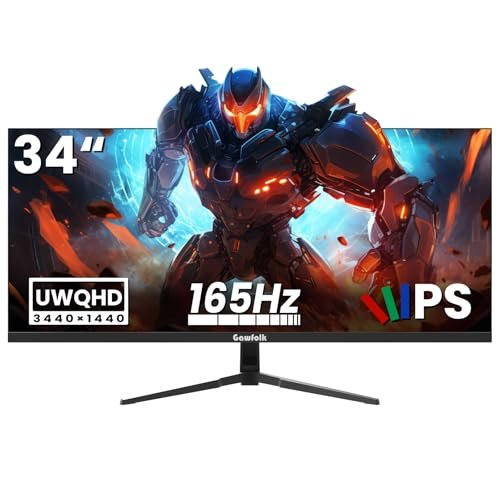
Gawfolk 165HZ 34-Inch Ultrawide Gaming Monitor In-Depth Review: Is It Worth the Money? (2026)
Check Gawfolk 165HZ 34-Inch Ultrawide Gaming Monitor Pricing
8.6/10 Editor's Rating- Active Offers: View current discounts and promotional deals
- Free Delivery: Eligible for free shipping and free returns
- Stock Status: Check real-time stock and configuration options
What We Like
- Fluid refresh rate for tear-free gaming
- Expansive curved WQHD IPS panel
- Built-in hardware screen splitting modes
- Multiple HDMI and DisplayPort inputs
What Could Be Better
- Lacks built-in internal speakers
- Maximum refresh requires DisplayPort cable
Jump to Section
- Gawfolk 165HZ 34-Inch Ultrawide Gaming Monitor Review: Ideal User Profiles
- UWQHD Panel Resolution & Visual Density
- 165Hz Refresh Rate & Motion Handling
- Hardware PIP & PBP Multitasking Mechanics
- Physical Adjustability & Input Port Selection
- Audio Hardware Omission & Cable Refresh Dependencies
- Long-Term Value & Verdict
- Frequently Asked Questions
- Specifications
Are your eyes aching from staring at a narrow 24-inch display that forces constant ALT-Tab switching? Investing in a gawfolk 165hz 34-inch ultrawide gaming monitor replaces desktop clutter with a single expansive canvas.
Expansive UWQHD Screen Real Estate: Delivering a sharp 3440×1440 resolution, this curved panel expands desktop space by 32% over standard 16:9 displays. You get crisp text rendering and fluid high-refresh motion across wide viewing angles.
Balancing high-speed gaming specs with dual-device productivity tools creates a versatile centerpiece for home setups. Examining panel hardware, input options, and daily thermal behavior shows where this display excels.
Gawfolk 165HZ 34-Inch Ultrawide Gaming Monitor Review: Ideal User Profiles
Matching your daily workflow to the right display format prevents buyer remorse and ensures desk hardware handles your tasks. The physical geometry and high refresh rate of this panel cater to distinct computing workflows.
Competitive FPS Gamers: Players needing fluid 165Hz motion tracking, low input latency, and an on-screen crosshair assist for targeting.
Multi-Device WFH Workers: Remote staff using Picture-in-Picture or Picture-by-Picture modes to run a laptop and desktop PC together.
Timeline Video Editors: Content creators who require extended horizontal space to view complex timeline tracks without zooming.
UWQHD Panel Resolution & Visual Density
Running 3440×1440 resolution across a 34-inch screen provides roughly 110 pixels per inch for sharp text detail. This pixel density keeps typography readable during coding sessions without system font scaling.
IPS panel technology offers steady 178-degree viewing angles with minimal color shift across the curved surface. Brightness peaks at 320 cd/m2, which cuts through ambient office lighting without causing eye fatigue.
Following EIZO’s visual fatigue prevention guidelines, keeping backlighting balanced against room lighting helps reduce eye strain. The 1000:1 contrast ratio keeps dark gray shades separated from true black zones.
Color reproduction relies on an 8-bit panel driver displaying 16.7 million hues for natural skin tones. Photographers editing web images benefit from consistent color saturation across the central work area.
Screen curvature wraps outer edges into peripheral vision to reduce head turning while tracking open apps. Side-by-side browser windows sit comfortably across the panel with ample width for notes.
Matte anti-glare coating diffuses reflections from overhead light fixtures and background windows. Working near windows remains comfortable because reflections turn into soft haze rather than mirror images.
See Current Gawfolk Pricing
- Live Pricing: Find out exactly what this is selling for right now.
- Shipping Times: See how fast this can arrive at your front door.
- Stock Status: Make sure it is actually in stock before you make a decision.
165Hz Refresh Rate & Motion Handling
Running fast games on the gawfolk 165hz 34-inch ultrawide gaming monitor delivers smooth animation with instant mouse response. Fast panning across game maps feels fluid and free from jittery frame skips.
Hardware FreeSync integration synchronizes display refresh rates directly with graphics card frame output. This link eliminates screen tearing during graphics scenes without adding v-sync input lag.
Pixel response times stay clean during rapid camera rotations in fast-paced shooter titles. Moving targets retain crisp outlines, allowing accurate tracking across open field environments.
The gameplay assist feature overlays a customizable hardware crosshair directly onto the center screen. This optical aid gives a stable aiming point in shooter games lacking default reticles.
Preset game modes adjust gamma curves and black equalizer settings for improved shadow visibility. Dark indoor game corridors show hidden detail without washing out bright outdoor skies.
High refresh rates also improve desktop comfort by making window dragging and mouse movement feel weightless. Scrolling through web pages or dense spreadsheets feels smooth on your eyes.
Hardware PIP & PBP Multitasking Mechanics
Integrated Picture-in-Picture (PIP) and Picture-by-Picture (PBP) processing handles two video streams simultaneously. You can view your work laptop while monitoring a dedicated video stream from a secondary PC.
PBP mode splits the 3440×1440 panel down the middle into two 1720×1440 display segments. Each connected computer recognizes its half as a dedicated display with native aspect ratio alignment.
PIP mode places a scalable sub-window over any corner of your main desktop feed. This configuration lets you keep an eye on monitoring tools while focusing on primary tasks.
Onscreen menu controls make switching audio sources between primary and secondary inputs simple. Quick button presses switch your sound output without unplugging any cable connections.
Eliminating external video switchers saves desk space and keeps cable management clean. Dual work systems fit onto a single desktop setup without adding extra switch boxes.
Streamers can output broadcast software preview windows on one side while gaming full-screen on the main section. This hardware split operates independently of computer operating system software.
Physical Adjustability & Input Port Selection
Rear connection options feature dual HDMI 2.0 ports and dual DisplayPort 1.4 inputs for linking devices. Connecting game consoles, desktop rigs, and laptops requires no constant cable swapping.
A standard 100x100mm VESA mounting pattern on the rear cabinet allows quick installation onto monitor arms. Upgrading to a desk-mounted arm frees up space beneath the screen for accessories.
The included desktop stand provides steady support with a compact footprint on wooden desk surfaces. Rubber pads beneath the base legs keep the display from sliding when adjusting tilt.
Tilt adjustment offers forward and backward angling to align the screen surface directly with your eye line. Setting proper viewing angles helps reduce neck strain during long computer sessions.
A dedicated 3.5mm audio jack routes digital sound signals from HDMI or DisplayPort connections to speakers. Connecting desktop speakers directly to the monitor simplifies audio wiring around your desk.
Internal power components connect via a simple DC input jack supplied by a compact power brick. Keeping heat-generating power circuitry outside the main chassis keeps the panel cool during long use.
Audio Hardware Omission & Cable Refresh Dependencies
Integrated speakers are absent from the cabinet, requiring external speakers or headphones for sound. Users expecting immediate audio output straight out of the box will need a dedicated sound bar.
Reaching the full 165Hz refresh rate requires a DisplayPort 1.4 connection, as HDMI inputs cap out at lower limits. Users relying solely on HDMI cables will miss out on maximum frame rate performance.
Long-Term Value & Verdict
Choosing a gawfolk 165hz 34-inch ultrawide gaming monitor upgrades both daily workspace productivity and immersive gaming. The combination of UWQHD resolution and dual-input multitasking features delivers strong functional value.
Solid panel build quality and versatile VESA mounting options ensure this display adapts as desk configurations grow. Solid energy efficiency keeps operating costs low over years of daily work and play.
The verdict: This 34-inch ultrawide display delivers an excellent balance of expansive screen space, fluid 165Hz motion, and multi-device productivity features. It is a smart desktop upgrade for users looking to streamline their dual-monitor setup into one clean screen.
Frequently Asked Questions
Can I mount the Gawfolk 34-inch ultrawide monitor on a third-party monitor arm?
Yes, the display includes standard 100x100mm VESA mounting holes on the rear panel cabinet. You can easily attach it to most heavy-duty single monitor arms or wall mounts.
Does this ultrawide monitor include built-in desktop speakers?
No, this model does not have internal speakers built into the cabinet. You can connect external desktop speakers or headphones using the 3.5mm audio output port on the back.
How do I get the full 165Hz refresh rate on this monitor?
You must connect your graphics card using a DisplayPort 1.4 cable to achieve the full 165Hz refresh rate. HDMI connections work great for multi-device hookups but cap out at lower refresh limits.
What is Picture-by-Picture mode and how does it help WFH work?
Picture-by-Picture (PBP) mode splits the 34-inch screen into two side-by-side display sections fed by separate computers. This allows you to view your work laptop and personal desktop PC simultaneously without extra hardware switchers.
Does FreeSync work with NVIDIA graphics cards on this monitor?
Yes, FreeSync technology works across modern AMD and NVIDIA graphics cards over DisplayPort connections. Enabling G-Sync compatibility in your NVIDIA control panel provides smooth tear-free gameplay.
Is a curved screen better for a 34-inch ultrawide monitor?
Curved screens bring the outer display edges closer to your natural field of view to reduce peripheral eye distortion. This gentle curve makes viewing wide documents and gaming scenes much more comfortable.
What display ports are available on the back of the monitor?
The rear port panel features dual HDMI 2.0 ports and dual DisplayPort 1.4 inputs alongside a 3.5mm audio jack. This input layout lets you keep up to four devices connected at the same time.
What warranty protection and package support comes with this monitor?
The monitor comes packaged with standard manufacturer warranty protection covering panel defects and hardware components. Customer support guidelines provide help for setup and troubleshooting needs.
Specifications
Ready to Upgrade Your Workspace?
8.6/10 Editor's Rating- Free Shipping: Eligible for fast and free delivery to your door
- Manufacturer Warranty: Backed by full brand support and coverage
- Flexible Returns: Shop with complete buyer protection and peace of mind