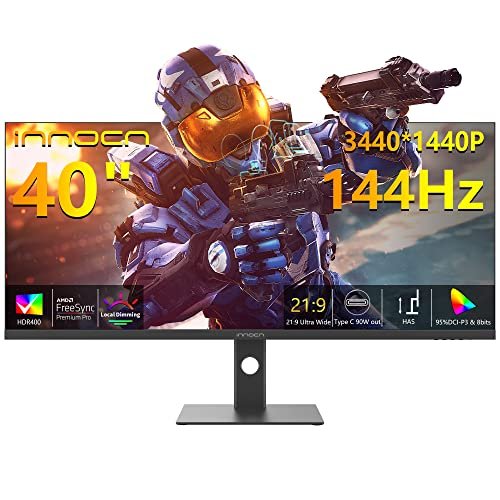
INNOCN 3440X1440P 40-Inch WQHD Ultrawide Monitor Full Review: Our Honest Opinion (2026)
Check INNOCN 3440X1440P 40-Inch WQHD Ultrawide Monitor Pricing
8.3/10 Editor's Rating- Active Offers: View current discounts and promotional deals
- Free Delivery: Eligible for free shipping and free returns
- Stock Status: Check real-time stock and configuration options
What We Like
- Vivid 40-inch flat IPS panel
- High 144Hz refresh rate support
- Powerful 90W USB-C power delivery
- Wide 95% DCI-P3 color gamut
What Could Be Better
- Flat panel lacks immersive curvature
- Large footprint consumes desktop space
Jump to Section
The innocn 3440x1440p 40-inch wqhd ultrawide monitor challenges the myth that expansive desktop screens require thousands of dollars; it offers vast workspace efficiency at a fraction of premium competitor prices. Buyers seeking strong financial returns on their home office budget can double their screen real estate without overspending.
Why it stands out: Combining an expansive 21:9 aspect ratio with a 144Hz refresh rate, this unit bridges the gap between daily work spreadsheets and smooth after-hours gaming. Its high 500-nit brightness level ensures clear viewing across bright room conditions.
Many professionals spend extra funds on dual-monitor setups that require complex cable routing. Selecting a single large ultrawide display streamlines desk setups while lowering hardware costs.
INNOCN 40-Inch Display: Ideal User Profiles
Identifying how this panel fits into your daily workflow helps determine its overall financial value. Here are the main user groups that benefit most from this specific display footprint.
- Active Multitaskers: Remote workers needing multiple side-by-side windows without buying extra monitor arms.
- Budget Hybrid Gamers: Players wanting fast refresh rates and broad color coverage without high flagship prices.
- Laptop Power Users: Mac and PC users who want a single-cable setup with integrated laptop charging.
Panel Visuals & Color Accuracy
High color coverage makes this IPS panel suitable for visual content creators working on tight budgets. Color accuracy remains stable across wide viewing angles, keeping images consistent.
Peak brightness reaches 500 nits, which helps reduce glare from bright room lighting. HDR400 certification enhances highlights when watching high-dynamic-range video content.
Before making a final purchase decision, checking key factors outlined in 6 Things to Consider Before You Buy an Ultra Widescreen Monitor helps set realistic expectations. Reading through essential hardware traits prevents unexpected setup issues on your desk.
The 3440×1440 resolution yields sharp text rendering for document editing and spreadsheet navigation. Pixel density offers clean detail without requiring aggressive operating system scaling.
Backlight uniformity across the panel keeps dark scenes looking balanced during video editing. Fine details in dark shadows stay visible without washed-out highlights.
Factory calibration provides realistic color reproduction right out of the box. Users can tweak display profiles quickly through intuitive built-in menu buttons.
See Current INNOCN Pricing
- Live Pricing: Find out exactly what this is selling for right now.
- Shipping Times: See how fast this can arrive at your front door.
- Stock Status: Make sure it is actually in stock before you make a decision.
Refresh Dynamics & Gaming Performance
Motion fluidity gets a noticeable boost from the native 144Hz refresh rate during fast-paced movement. Smooth frame rendering keeps fast action titles clear without distracting motion blur.
AMD FreeSync Premium eliminates screen tearing by matching panel refresh rates with frame output. Variable refresh rate technology keeps gameplay feeling fluid even during hardware frame drops.
Low response time keeps input delay minimal for competitive multiplayer gaming sessions. Command execution feels direct and responsive during fast mouse sweeps.
Casual gamers will appreciate the expansive 21:9 field of view in supported titles. Wider peripheral vision reveals extra environmental details in open-world games.
Console compatibility lets users switch between desktop computing and gaming system inputs easily. Integrated hardware scaling handles high-definition video feeds without stretching images unnaturally.
Game mode presets adjust contrast and black levels to improve target visibility in dark scenes. Players can save custom profiles for quick switching between different game genres.
USB-C Connectivity & Cable Management
The single USB-C port handles video input, data transfer, and up to 90W of laptop charging simultaneously. Eliminating separate laptop power bricks keeps clean desktop surfaces free of cluttered wires.
Purchasing the innocn 3440x1440p 40-inch wqhd ultrawide monitor cuts spending on separate USB docking stations. Built-in ports transform the screen into a functional central hub for peripherals.
Dual HDMI 2.0 ports and DisplayPort 1.4 offer options for connecting secondary computers or consoles. Switching active inputs requires only a few quick button presses on the display bezel.
Audio passthrough capabilities allow easy connection to external speakers or desktop headphones. Audio quality stays clear through standard 3.5mm headphone connections.
Port placement on the rear panel points downwards to keep plugged cables tucked neatly out of view. Included cable routing channels guide wiring straight down behind the stand column.
Power delivery remains stable during heavy laptop workload rendering tasks. Connected notebooks stay fully charged without needing secondary power supplies.
Mounting Ergonomics & Stand Adjustments
Stand design includes height adjustments and forward-backward tilt to help maintain healthy working postures. Lowering neck strain over long work sessions protects user comfort and long-term health.
Solid base construction prevents display wobbling when typing or adjusting desktop items. The wide foot design provides balanced support across smooth table surfaces.
VESA mount compatibility allows mounting onto third-party monitor arms or wall brackets. Standard 100x100mm mounting patterns fit most heavy-duty desk arm hardware.
Flat panel geometry works well for users who prefer straight lines over curved screens. Spatial distortion remains minimal when reviewing engineering drawings or alignment grids.
Adjusting screen height requires minimal physical effort while holding position reliably. Stand joints remain firm without slipping down over prolonged periods.
Overall footprint requires almost ten inches of depth on your desk surface. Planning desk space beforehand prevents crowding keyboard trays or work accessories.
Drawbacks and Physical Limitations
Flat screen geometry on a 40-inch monitor means outer screen edges sit further from your eyes than the center. Users working close to the display may notice mild contrast shifts near extreme outer corners.
The wide 37-inch chassis occupies significant desk surface space and requires a sturdy desk top. Operating the innocn 3440x1440p 40-inch wqhd ultrawide monitor in tight work corners proves challenging due to its sheer width.
Long-Term Value & Verdict
Combining high color accuracy, rapid refresh rates, and 90W USB-C connectivity into an affordable package provides high financial returns over years of daily use. Eliminating the need for separate docks and dual monitors saves significant funds upfront.
The verdict: Choosing the innocn 3440x1440p 40-inch wqhd ultrawide monitor is a smart financial move for buyers seeking maximum screen area without premium brand price tags.
Strong hardware specs paired with flexible workspace connections ensure this panel delivers reliable long-term utility. It stands out as an effective budget upgrade for modern home offices.
Frequently Asked Questions
Does the INNOCN 40-inch monitor support MacBook charging over USB-C?
Yes, the USB-C port provides up to 90W of power delivery to charge connected laptops. It handles video, data, and power simultaneously over a single cable.
Can this ultrawide display be mounted on a standard monitor arm?
Yes, it features standard VESA mount compatibility on the rear cabinet. Ensure your monitor arm supports the weight and width of a 40-inch panel.
Is a flat ultrawide screen good for daily office productivity?
Flat ultrawide panels maintain straight lines without image bending or visual distortion. They work exceptionally well for spreadsheet editing, software timeline work, and multi-window browsing.
Does this monitor include built-in speakers for audio playback?
The display includes audio passthrough through a 3.5mm headphone jack for external audio gear. Connecting external desktop speakers provides the best sound experience for music and gaming.
What is the maximum refresh rate supported over HDMI ports?
The HDMI 2.0 ports support high refresh rates, though reaching the full 144Hz requires DisplayPort or USB-C. Using the included DisplayPort cable unlocks maximum gaming performance for your PC.
Specifications
Ready to Upgrade Your Workspace?
8.3/10 Editor's Rating- Free Shipping: Eligible for fast and free delivery to your door
- Manufacturer Warranty: Backed by full brand support and coverage
- Flexible Returns: Shop with complete buyer protection and peace of mind