HODO USB C Docking Station Ultimate Review: Worth the Cost? (2026)
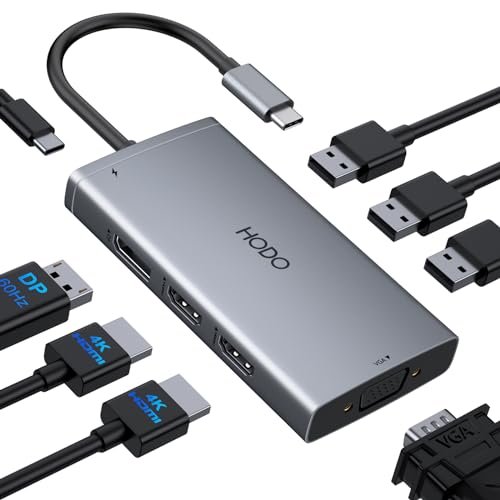
Check HODO USB C Docking Station Pricing
8.6/10 Editor's Rating- Active Offers: View current discounts and promotional deals
- Free Delivery: Eligible for free shipping and free returns
- Stock Status: Check real-time stock and configuration options
What We Like
- Dual 4K video output support
- Pass-through 100W power delivery capability
- Compact lightweight travel-friendly chassis
- Lag-free USB peripheral responsiveness
What Could Be Better
- MacOS limits external monitors to mirror mode
- Legacy USB 2.0 data transfer speeds
Jump to Section
- HODO Multi-Display Hub Review: Ideal User Profiles
- Video Output & Multi-Monitor Distribution
- Power Delivery & Thermal Management
- Peripheral Connectivity & USB Speeds
- Compatibility Rules & Laptop Driver Demands
- The Negative Flaws & Limitations Section
- Long-Term Value & Verdict
- Frequently Asked Questions
- Specifications
Sorting through cheap plastic hubs while resting a coffee mug on a cluttered desk reveals how similar most budget expansion accessories really are. The hodo usb c docking station promises an 8-in-1 solution to clear desktop cord tangles without costing a fortune.
Many multi-monitor adapters promise desktop replacement performance but crumble under real daily workloads. Skeptical buyers are right to question whether this lightweight gray dongle can handle multi-screen setups without overheating or dropping signals.
Why it stands out: Packed with four separate video outputs and high-wattage power pass-through, this unit attempts to turn a single laptop connection into a complete workstation hub. Understanding its hardware limits helps buyers avoid regret before plugging in extra monitors.
HODO Multi-Display Hub Review: Ideal User Profiles
Identifying proper usage scenarios prevents unexpected display bottlenecks when attaching multiple external screens. Different operating systems handle extended displays quite differently across these multi-port outputs.
- Windows Multitaskers: Windows laptop owners who need dual or triple extended displays will benefit most from the native DisplayPort Alternate Mode capabilities.
- Mobile Professionals: Remote workers needing a featherweight 8-in-1 dongle can toss this quarter-pound unit into any laptop sleeve effortlessly.
- Basic Office Workstations: Desk setups running standard mice, keyboards, and dual 1080p office displays will find all core ports ready for daily duties.
Video Output & Multi-Monitor Distribution
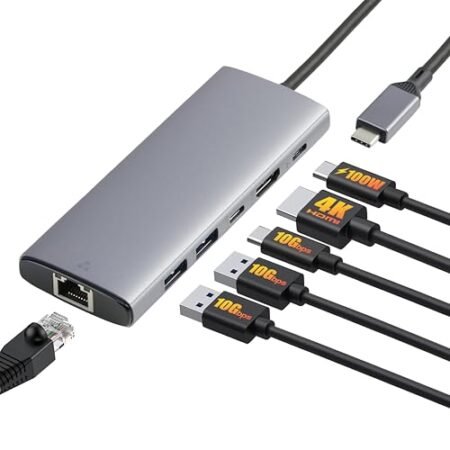
Configuring multiple monitors on a budget dongle often brings bandwidth surprises that catch users off guard. The unit features two HDMI ports, one DisplayPort connection, and a legacy VGA connector crammed into a small aluminum shell.
Running a single monitor allows crisp 4K output at a smooth 60Hz refresh rate through the primary HDMI or DisplayPort connections. Adding a second 4K display shifts performance down depending on display protocol support built into your host computer hardware.
Connecting four displays simultaneously forces all video feeds down to basic 1080p resolution at 60Hz across every screen. Plugging in the analog VGA cable immediately caps overall display bandwidth for the entire dock regardless of screen count.
Consulting independent resources like the Serious Insights Buyers Guide: How to Choose a USB-C Dock provides clear context on display bandwidth limitations. Knowing these video limits beforehand prevents frustration when setting up multi-screen desk arrangements.
MacBook owners face significant software constraints due to Apple platform display routing rules. On macOS, external screens are locked into mirror mode, showing identical imagery across connected external monitors.
Windows users enjoy full extended desktop modes, allowing independent app windows on each monitor. Testing video signal stability over long work sessions shows reliable picture rendering without flickering issues.
See Current HODO Pricing
- Live Pricing: Find out exactly what this is selling for right now.
- Shipping Times: See how fast this can arrive at your front door.
- Stock Status: Make sure it is actually in stock before you make a decision.
Power Delivery & Thermal Management
Charging modern laptops through a pass-through hub requires stable electrical flow and thermal dissipation. The dedicated USB-C Power Delivery port handles up to 100W input while routing 87W directly into your host machine.
Reserving 13W of incoming power allows the hub to energize connected peripherals without dropping connections. Users should plug in a high-wattage wall adapter to prevent system low-power warnings during high activity.
Sustained power pass-through generates noticeable warmth across the compact gray chassis over extended work shifts. Aluminum housing acts as a passive heat sink, keeping internal circuits cool without needing noisy internal fans.
Plugging demanding ultraportables like Dell XPS or HP EliteBook machines results in steady battery top-offs throughout the day. Power delivery remains stable even when toggling multi-screen displays and heavy USB data operations.
Leaving the dock running continuously under full load causes temperatures to warm up without burning your skin. Compact design choices make this warm operating state normal for un-fanned USB expansion gear.
Using stock low-wattage smartphone chargers will trigger system power warnings on connected laptops. Stick with 65W or higher power bricks to ensure your laptop stays properly powered.
Peripheral Connectivity & USB Speeds
Connecting daily desktop accessories relies on the trio of USB 2.0 ports lined along the side panel. These legacy ports provide stable signals ideal for low-bandwidth input gear like wireless mice receivers and mechanical keyboards.
Data transfer speeds top out at 480Mbps, making these ports slower for moving massive video files or external hard drive backups. For basic flash drives and light documents, transfer rates handle ordinary office files without issue.
Separating input devices onto dedicated USB 2.0 channels prevents wireless mouse stutter commonly found on crowded USB 3.0 hubs. Keystrokes register instantly without dropped characters or annoying signal lag.
Leaving your high-speed SSD storage attached to this unit will bottleneck file copy operations significantly over time. Media creators needing fast file transfers should plug high-speed drives directly into laptop ports instead.
Plugging in simple desktop accessories keeps desk wiring organized behind your monitor setup. The compact port spacing holds standard USB plugs snugly without wiggle room or loose contact faults.
Over months of daily workstation use, these standard connections withstand repeated plugging without physical wear. The hodo usb c docking station maintains reliable connection contacts through routine desk setups.
Compatibility Rules & Laptop Driver Demands
Verifying hardware specs before purchasing saves time spent troubleshooting display output errors. This hub requires a full-featured USB-C port supporting DisplayPort Alternate Mode and Power Delivery protocols.
Laptops equipped with basic data-only USB-C ports cannot output video or charge through this adapter. Checking laptop user manuals ensures your computer hardware includes proper video pass-through support.
Plug-and-play setup removes the headache of downloading third-party display drivers before getting to work. Plugging the main USB-C cable into a supported laptop instantly activates attached video screens.
Popular ultrabooks from HP, Dell, and Lenovo recognize the dock immediately upon first connection. Legacy gaming laptops often lack DisplayPort Alt Mode, rendering video output ports completely unusable on those machines.
Driver-free operation makes switching between work and personal laptops fast and painless. Simply swap the single host cable to transition your entire desk setup between machines.
Understanding port compatibility ensures the hodo usb c docking station functions smoothly right out of the box. Proper hardware alignment guarantees hassle-free daily display connectivity for busy professionals.
The Negative Flaws & Limitations Section
Accepting compromise is part of choosing a compact multi-port expansion adapter over expensive desktop docks. The presence of three legacy USB 2.0 ports limits data transfer performance for modern external storage drives.
MacOS display mirror limitations severely restrict multi-monitor productivity for Apple computer owners. Plus, attaching a VGA monitor drops video output resolutions across all attached screens down to 1080p.
Long-Term Value & Verdict
Balancing portable design with 8-in-1 port expansion makes this unit a practical workstation tool for mobile workers. Reliable power pass-through and multiple display outputs deliver core desktop expansion without taking up workspace real estate.
Windows laptop users gain incredible multi-monitor flexibility, while Mac owners must account for mirror mode limitations. Solid aluminum casing ensures physical longevity through daily commute packing and desk reorganizations.
The verdict: For Windows users needing multi-monitor output and high-wattage charging in a compact dongle, the hodo usb c docking station offers practical value despite USB 2.0 data constraints.
Frequently Asked Questions
Does the HODO USB C Docking Station work with MacBooks?
Yes, it works with MacBooks, but macOS limits external displays to mirror mode only. Both connected external screens will show identical images rather than independent desktop extensions.
Why do my external displays drop to 1080p resolution?
Plugging in the analog VGA cable forces all connected monitors to max out at 1080p resolution. Disconnecting the VGA display allows HDMI and DisplayPort connections to render higher 4K resolutions.
Does this docking station include a power charger?
No, the unit does not include an external power supply or wall charger in the box. You must supply a 65W or higher USB-C power charger to pass electricity through to your laptop.
Can I transfer files quickly using the built-in USB ports?
The USB ports operate on the USB 2.0 standard with speeds up to 480Mbps, which is suited for peripherals rather than fast external drive backups. High-speed storage drives should be plugged directly into your computer.
Will this docking station work on any laptop USB-C port?
No, your laptop’s USB-C port must support DisplayPort Alternate Mode and Power Delivery protocols for full functionality. Laptops with data-only USB-C ports cannot pass video or charge through this dock.
Does the docking station get hot during continuous daily use?
The aluminum body acts as a heat sink, causing the unit to feel warm during heavy power delivery and display routing. This temperature warmth is normal operating behavior and does not damage internal components.
Specifications
Ready to Upgrade Your Workspace?
8.6/10 Editor's Rating- Free Shipping: Eligible for fast and free delivery to your door
- Manufacturer Warranty: Backed by full brand support and coverage
- Flexible Returns: Shop with complete buyer protection and peace of mind