VVB USB C Laptop Docking Station Ultimate Review: Is It a Smart Buy? (2026)
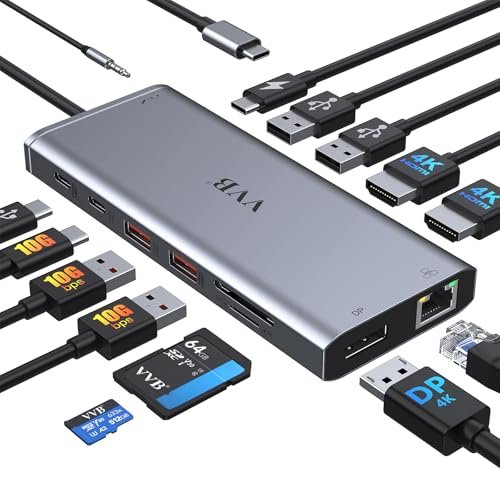
Check VVB USB C Laptop Docking Station Pricing
9.7/10 Editor's Rating- Active Offers: View current discounts and promotional deals
- Free Delivery: Eligible for free shipping and free returns
- Stock Status: Check real-time stock and configuration options
What We Like
- Versatile 14-in-1 port expansion hub layout
- Supports triple 4K external display outputs
- Rapid 10Gbps USB 3.1 data transfer ports
- Fast 100W USB-C Power Delivery pass-through
What Could Be Better
- MacOS limited to mirrored external display mode
- Requires external power supply brick for passthrough
Jump to Section
- VVB Multiport Desktop Expansion Hub Review: Ideal User Profiles
- 14-in-1 Port Layout & Multi-Device Connections
- Triple 4K Display Outputs & Multi-Monitor Modes
- 10Gbps USB 3.1 Data Speed & Memory Card Slots
- 100W Power Delivery Pass-Through & Gigabit Ethernet
- MacOS Display Mirroring & External Power Supply Need
- Long-Term Desktop Hub Value & Final Verdict
- Frequently Asked Questions
- Specifications
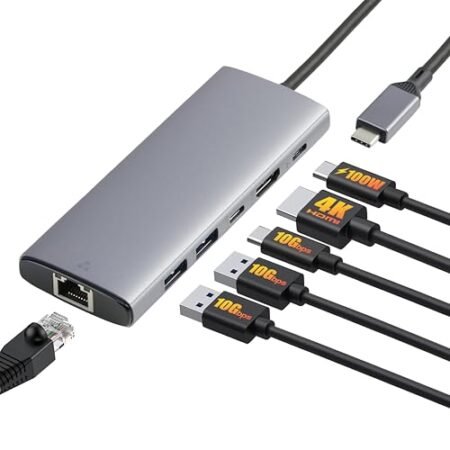
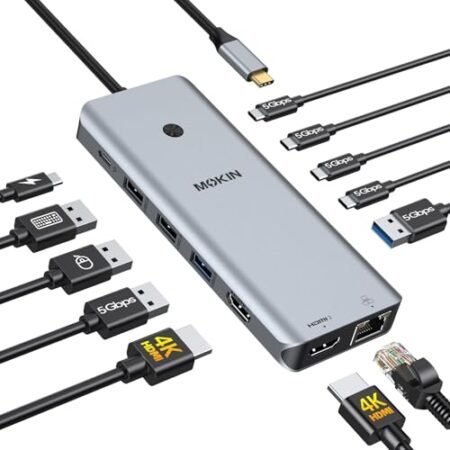
Modern slim laptops can’t connect multiple displays and peripherals without extra dongles; plugging in the vvb usb c laptop docking station expands a single Type-C port into fourteen high-speed connections. Consolidating all your desktop cables into one hub makes daily desk clutter disappear immediately.
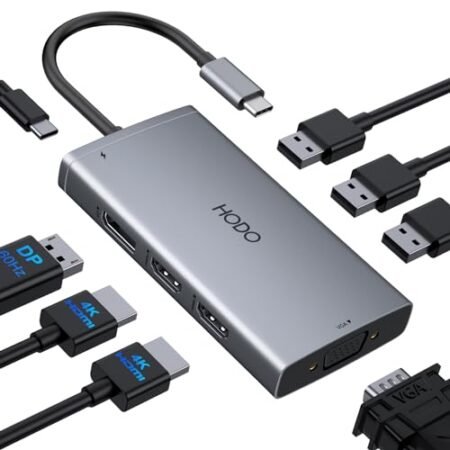
Primary Docking Hardware Focus: Dual 4K HDMI ports paired with a DisplayPort output allow Windows laptops to drive up to three external screens simultaneously. A 100W USB-C Power Delivery pass-through port charges your computer while transferring data over Gigabit Ethernet.
Dedicated 10Gbps USB 3.1 ports transfer large video files in seconds, while legacy USB 2.0 ports provide lag-free wireless mouse connections. Compact aluminum housing keeps desktop footprints small while routing cables neatly behind your workstation.
VVB Multiport Desktop Expansion Hub Review: Ideal User Profiles
Choosing a multiport USB-C dock depends on monitor counts, data transfer speeds, and laptop charging power requirements. Specific hardware features on this 14-in-1 desktop hub suit distinct office operators.
Windows Multi-Screen Professionals: Financial analysts and software engineers expanding Windows laptops across three external monitors gain independent desktop space.
Content Creators & Media Editors: Photographers offloading camera footage benefit from built-in SD card readers and 10Gbps high-speed storage ports.
Single-Cable Hot-Deskers: Hybrid workers connecting home laptops to desktop setups plug in one main USB-C cable for power, internet, and monitors.
14-in-1 Port Layout & Multi-Device Connections
Following simple docking station connection and port setup steps simplifies connecting external displays, external hard drives, and wired network cables. Connecting one main host cable turns your portable laptop into a full desktop workstation.
The front panel features easily accessible memory card slots, a 3.5mm audio jack, and high-speed USB-C data ports. Rear port layouts group permanent display cables and Ethernet connections out of direct sight.
Integrated SD and MicroSD card readers read camera storage cards simultaneously without requiring separate USB dongles. Rapid card reading speeds help photographers transfer high-resolution RAW photos in seconds.
Two dedicated USB 2.0 ports provide stable signal channels for wireless mouse dongles and keyboards. Separating 2.4GHz wireless receivers from USB 3.1 ports prevents wireless signal stuttering during daily computer use.
A built-in 3.5mm audio jack supports wired headsets and external speakers for Zoom conference calls. Clean internal audio circuitry keeps background static low when speaking through connected microphones.
Choosing the vvb usb c laptop docking station expands laptop connectivity across fourteen total input channels. Grouping desktop peripherals into one hub improves workspace organization.
See Current VVB Pricing
- Live Pricing: Find out exactly what this is selling for right now.
- Shipping Times: See how fast this can arrive at your front door.
- Stock Status: Make sure it is actually in stock before you make a decision.
Triple 4K Display Outputs & Multi-Monitor Modes
Equipped with two 4K HDMI ports and one 4K DisplayPort connection, this hub drives up to three external screens. Single monitor setups achieve crisp 4K resolution at 60Hz over HDMI 1 or DisplayPort channels.
Connecting two external screens under Windows operating systems supports dual 4K output for detailed spreadsheet work. Multi-stream transport technology lets Windows users extend different application windows across all screens.
Triple screen configurations under Windows run smooth 1080p resolutions across three external monitors simultaneously. Spreading reference documents, email clients, and primary code editors speeds up daily multitasking.
Durable internal video processing chips handle multi-monitor signals without screen flickering or signal drops. Heat dissipation vents along side edges prevent thermal throttling during long work hours.
Standard DisplayPort 1.4 compatibility ensures high bandwidth video transmission across modern desktop displays. Sharp text rendering prevents eye strain when reading fine details on dual 4K screens.
Investing in the vvb usb c laptop docking station delivers powerful multi-screen productivity for Windows laptops. Extended display modes help remote workers complete complex tasks faster.
10Gbps USB 3.1 Data Speed & Memory Card Slots
One USB-C data port and two USB-A 3.1 ports provide rapid 10Gbps transfer bandwidth for external solid-state drives. Transferring a 10GB high-definition video file takes under fifteen seconds across these high-speed ports.
High data throughput eliminates bottlenecks when editing video files directly from connected external storage drives. Steady data streams prevent dropped frames during video playback or file archiving.
Durable USB port sockets hold flash drive connectors snugly, preventing accidental disconnections during data transfers. Metal internal shielding protects data channels against electromagnetic interference.
Dual card reader slots accept standard SD cards and MicroSD memory cards without needing plastic adapter sleeves. Card slots feature spring-assisted locking mechanisms that hold cards securely during data access.
Simultaneous card reading lets you transfer photos from drone SD cards and action camera MicroSD cards at the same time. Fast card copying speeds shorten media offloading routines after photo shoots.
Using the vvb usb c laptop docking station accelerates file management for media creators and data professionals. High-speed USB ports keep external drives performing at maximum rates.
100W Power Delivery Pass-Through & Gigabit Ethernet
The dedicated USB-C Power Delivery input port accepts up to 100W power input from your laptop wall charger. Safe pass-through circuitry routes up to 87W of charging power directly into your connected computer battery.
Pass-through power keeps demanding laptops charged continuously while powering all fourteen connected hub ports. You can run external hard drives, keyboards, and displays without draining your laptop battery power.
An integrated Gigabit Ethernet port provides solid wired network connections up to 1000Mbps speed. Wired LAN connections eliminate Wi-Fi latency spikes during important video calls or large cloud uploads.
Activity status LEDs built into the RJ45 Ethernet socket indicate active network connection speeds at a glance. Plug-and-play network drivers install automatically on Windows and MacOS laptops without manual setup.
Advanced power management chips prevent over-current and short-circuit damage during sudden electrical spikes. Intelligent power distribution allocates wattage safely across connected USB peripherals.
Buying the vvb usb c laptop docking station provides reliable single-cable charging and fast wired internet connectivity. Fast charging capabilities keep your workstation powered throughout long work shifts.
MacOS Display Mirroring & External Power Supply Need
Apple MacOS limits external multi-monitor video outputs due to operating system driver constraints, mirroring external screens rather than extending independent desktops. Mac users connecting dual or triple monitors will see identical images across all external displays.
The docking station requires an external USB-C power adapter plugged into its PD port to pass charging power to your laptop. The package omits a wall charger brick, requiring users to supply their own laptop power adapter.
Long-Term Desktop Hub Value & Final Verdict
Constructing a 14-in-1 port layout with 10Gbps data speeds and 100W Power Delivery pass-through creates strong desktop value. Aluminum construction and Gigabit Ethernet connectivity ensure dependable daily performance for home offices.
The verdict: Purchasing the vvb usb c laptop docking station provides a versatile, single-cable expansion hub that streamlines Windows multi-monitor workstations. High-speed ports and reliable power pass-through deliver great daily utility.
For Windows laptop users wanting triple display outputs and rapid file transfers, this docking station performs exceptionally well. Robust hardware features and clean cable management make it a smart workspace upgrade.
Frequently Asked Questions
Does the VVB USB-C docking station work with MacBooks?
Yes, the dock connects to MacBooks for charging and data transfer, but MacOS limits external displays to mirrored mode. Mac users cannot extend independent desktops across multiple external screens.
How much charging power does the VVB docking station supply?
The hub accepts up to 100W Power Delivery input and passes up to 87W of safe charging power to your connected laptop. The remaining power operates internal hub circuitry and connected USB devices.
Does this docking station include a wall power charger?
No, the package includes the docking station and host USB-C cable but omits a wall power adapter. You must plug your laptop’s original USB-C power charger into the dock’s PD port.
What display resolutions does the VVB docking station support?
Single monitor setups support up to 4K resolution at 60Hz over HDMI 1 or DisplayPort. Dual monitor configurations run 4K at 30Hz, while triple monitor setups run at 1080p resolution.
Do I need to install software drivers for the Gigabit Ethernet port?
No, the Gigabit Ethernet port features plug-and-play installation for Windows and MacOS laptops. Plugging in an Ethernet cable automatically establishes a stable wired network connection.
Specifications
Ready to Upgrade Your Workspace?
9.7/10 Editor's Rating- Free Shipping: Eligible for fast and free delivery to your door
- Manufacturer Warranty: Backed by full brand support and coverage
- Flexible Returns: Shop with complete buyer protection and peace of mind