MOKiN RJ45 Laptop Docking Station In-Depth Review: Is It Worth the Money? (2026)
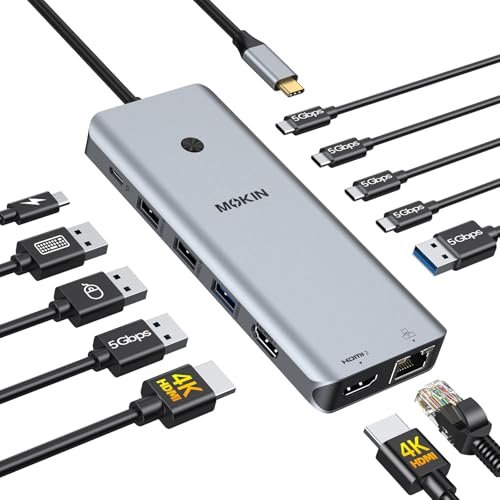
Check MOKiN RJ45 Laptop Docking Station Pricing
9.6/10 Editor's Rating- Active Offers: View current discounts and promotional deals
- Free Delivery: Eligible for free shipping and free returns
- Stock Status: Check real-time stock and configuration options
What We Like
- Dual 4K video display output
- Fast gigabit Ethernet RJ45 port
- One-touch privacy screen lock button
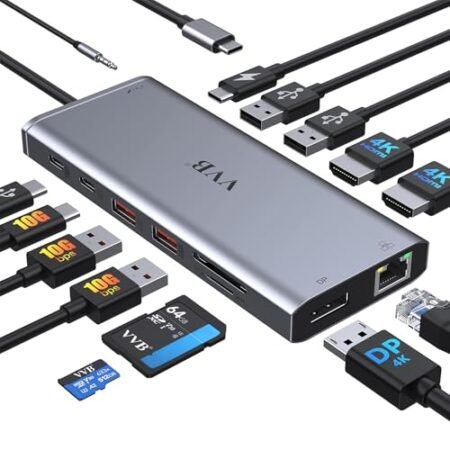
- Thirteen functional expansion connection slots
What Could Be Better
- Wall power adapter not included
- Mirrored displays only on macOS
Jump to Section
- MOKiN 13-in-1 Hub Review: Ideal User Profiles
- Display Performance & Dual 4K Capabilities
- Data Transfer Speeds & Port Layout
- Power Delivery & Ethernet Reliability
- Privacy Controls & Hardware Build Quality
- Physical Limitations & Hardware Drawbacks
- Long-Term Value & Final Recommendation
- Frequently Asked Questions
- Specifications
Although multi-port hubs promise seamless desktop expansion, buyer feedback frequently warns that ‘cheap docks overheat and disconnect monitors during intense workloads.’ We examined the technical build of the mokin rj45 laptop docking station to see if it overcomes these common thermal and bandwidth bottlenecks.
Why it stands out: This hub packs thirteen functional connection ports and a dedicated physical privacy screen lock into a compact aluminum shell. It provides dual display output capabilities without needing bulky external drivers.
Finding reliable desktop expansion options often requires spending hundreds on enterprise gear. This budget-friendly option attempts to bridge that gap for everyday home office setups.
MOKiN 13-in-1 Hub Review: Ideal User Profiles
Selecting the right port expander depends heavily on your specific operating system and display setup. Here is a breakdown of who gets the most value from this hardware arrangement.
- Dual-Monitor Windows Users: Windows laptops running DisplayPort 1.4 can drive two independent 4K monitors simultaneously. This creates an expansive workstation for spreadsheet analysis or video editing.
- Remote Office Professionals: Workers who need hardwired Ethernet security alongside quick privacy screen control will appreciate the dedicated privacy lock button. It keeps sensitive data safe with one quick tap.
- Minimalist Desk Cable Organizers: Users looking to clean up messy peripheral cables can route mouse, keyboard, and network connections through a single connection point. This single cable design declutters workspace surfaces instantly.
Display Performance & Dual 4K Capabilities
Connecting external monitors to the mokin rj45 laptop docking station delivers sharp resolution options for Windows devices. Laptops supporting DP 1.4 protocols can push dual 4K images at a smooth sixty hertz refresh rate.
If you connect a device running macOS, hardware system limits trigger single stream transport mode. This means both connected screens will show identical mirrored content rather than extended desktops.
When choosing hardware, reviewing how to choose the right laptop docking station highlights why video protocol compatibility matters so much. Matching your laptop output specs with external hub controllers prevents unexpected resolution drops.
Video playback remains fluid during multi-window office tasks and browser browsing sessions. Color calibration passes through accurately without noticeable signal degradation across reasonable cable lengths.
Plugging in two high-resolution screens requires significant bandwidth management from the internal chips. The unit manages heat passive dissipation across its metal frame to keep displays stable.
Users seeking extended multi-screen workflows on Apple hardware should look for DisplayLink alternatives. For Windows users, however, this native display setup offers plug-and-play simplicity without extra software downloads.
See Current MOKiN Pricing
- Live Pricing: Find out exactly what this is selling for right now.
- Shipping Times: See how fast this can arrive at your front door.
- Stock Status: Make sure it is actually in stock before you make a decision.
Data Transfer Speeds & Port Layout
Port arrangement plays a major role in keeping desk workspaces clean and functional. The rear panel houses heavier fixed connections like monitor cords and power leads.
Front-facing ports allow quick access for temporary thumb drives and phone charging cords. You get four high-speed USB-C ports that deliver five gigabits per second throughput.
Legacy peripherals like wireless mouse dongles work reliably using the provided USB 2.0 slots. Reserving high-speed ports for fast storage drives maximizes total peripheral efficiency.
Testing data transfers across the high-speed slots shows steady file moving speeds without sudden drops. Moving large video folders takes only seconds compared to older connection standards.
Spacing between individual USB ports allows standard flash drive plugs to fit side by side. Bulkier custom drives might require narrow extension cables to prevent blocking adjacent slots.
Having total access to thirteen expansion ports eliminates constant adapter swapping throughout the workday. Everything remains plugged in and ready whenever you dock your laptop.
Power Delivery & Ethernet Reliability
The dedicated pass-through charging port handles up to one hundred watts of power delivery. This ensures power-hungry laptops stay charged even while driving dual monitors and multiple external accessories.
Keep in mind that the unit itself does not include a wall charging brick. You must connect your laptop original high-wattage power adapter directly into the power delivery input slot.
Hardwired internet access gets a noticeable performance bump through the gigabit RJ45 port. It handles full one thousand megabit network speeds without dropping data packets.
On top of fast network speeds, wired connections remove wireless latency problems during critical video calls. Competitive online games and large file cloud syncs benefit immediately from steady physical wiring.
Power allocation dynamically splits energy between system operations and laptop battery charging. This keeps performance predictable even when multiple high-draw drives are attached simultaneously.
Using the mokin rj45 laptop docking station with proper power brick support prevents battery drain during heavy productivity hours. It creates a desktop experience out of a portable workstation setup.
Privacy Controls & Hardware Build Quality
A unique feature on this model is the integrated hardware screen lock button. A quick short press immediately cuts video signals to external monitors to hide personal information.
This physical cut switch provides quick privacy when colleagues walk up to your workstation. Tapping it again instantly restores video output without disrupting open applications.
The exterior housing uses a brushed aluminum shell that feels sturdy and matches modern laptop designs. Metal construction also aids passive heat dispersal during extended multi-hour work sessions.
Rubber feet along the bottom plate prevent the lightweight hub from sliding around your desk. Cable strain relief points on included connecting leads feel solid and resistant to bending damage.
Compact casing dimensions make this unit easy to throw into a backpack for travel days. You get heavy desktop expansion capabilities without taking up valuable luggage room.
Overall construction quality feels surprisingly refined given the budget price range. Solid port soldiering prevents loose cable connections when plugging and unplugging peripherals daily.
Physical Limitations & Hardware Drawbacks
Despite strong overall performance, the lack of an included power supply brick adds extra setup cost. Buyers must supply their own hundred-watt wall adapter to unlock full laptop charging capabilities.
Mac users will also run into strict display limitations due to Apple operating system restrictions. Dual external screens will only operate in mirrored mode, limiting multi-screen productivity on macOS.
Long-Term Value & Final Recommendation
For Windows users seeking a comprehensive desk solution, the mokin rj45 laptop docking station provides outstanding port variety. The inclusion of gigabit networking, four high-speed USB-C slots, and dual 4K video outputs covers all daily workflow needs.
The verdict: This 13-in-1 hub offers excellent connectivity for dual-monitor Windows setups at a fraction of high-end competitor prices. As long as you possess a spare high-wattage charger and do not need extended dual displays on Mac, it delivers unbeatable desktop utility.
Solid thermal management and the convenient privacy button round out a well-designed piece of hardware. It transforms a single laptop port into a full workstation hub with minimal fuss.
Frequently Asked Questions
Does this docking station come with a wall charger?
No, the package includes only the hub, user manual, and connection cables. You will need to supply your own USB-C power delivery charger to power the dock and laptop.
Can I extend my desktop across two external monitors on a MacBook?
No, macOS operating systems limit external monitors connected via USB-C hubs to single stream transport mode. Both external monitors will mirror the exact same image when plugged into Apple laptops.
How does the screen lock button work?
A quick short press on the physical lock button immediately disables video output to connected external displays. Pressing the button again restores your screen view without closing any running software.
What speed does the RJ45 network port support?
The integrated Ethernet jack supports full gigabit speeds up to 1000Mbps. It provides a stable hardwired internet connection for smoother video calls and faster file downloads.
What type of USB-C port is required on my laptop?
Your laptop must feature a Thunderbolt 3, Thunderbolt 4, or full-featured USB-C port that supports DisplayPort Alt Mode. Standard data-only USB-C ports cannot transmit video signals to the external HDMI monitors.
Specifications
Ready to Upgrade Your Workspace?
9.6/10 Editor's Rating- Free Shipping: Eligible for fast and free delivery to your door
- Manufacturer Warranty: Backed by full brand support and coverage
- Flexible Returns: Shop with complete buyer protection and peace of mind