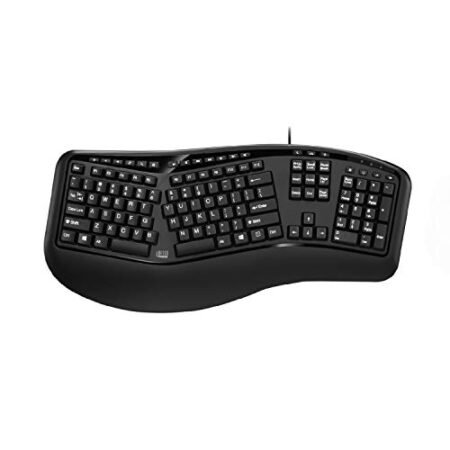
KINESIS Freestyle Edge RGB Plus Split Mechanical Keyboard Definitive Review: Our Honest Opinion (2026)
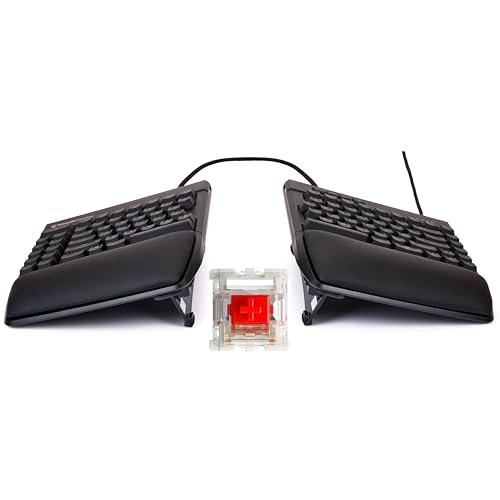
Check KINESIS Freestyle Edge RGB Plus Split Mechanical Keyboard Pricing
9.5/10 Editor's Rating- Active Offers: View current discounts and promotional deals
- Free Delivery: Eligible for free shipping and free returns
- Stock Status: Check real-time stock and configuration options
What We Like
- Hot-swappable key switch sockets
- Included tenting lift kit
- Adjustable split module distance
- Ergonomic wrist alignment design
What Could Be Better
- Interconnecting cable adds desk clutter
- Brief adjustment period for beginners
Jump to Section
- Kinesis Ergonomic Split Keyboard Review: Ideal User Profiles
- Ergonomic Shape & Wrist Angle Adjustments
- Switch Performance & Hotswap Mechanics
- Keycap Durability & Frame Quality
- Lift Kit Dynamics & Tenting Support
- The Negative Flaws & Limitations Section
- Long-Term Value & Verdict
- Frequently Asked Questions
- Specifications
Upgrading to a split workspace layout provides immediate ergonomic benefits by protecting your wrist joints during an 8-hour workday. Investing in a dual-module design reduces repetitive strain injuries that often cost thousands in physical therapy over a corporate career.
Why it stands out: By separating the typing surface into two distinct modules, this model lets desktop users position their hands at natural shoulder width. The integrated hotswap PCB and inclusion of a lift kit provide custom tilt angles that keep forearm muscles fully relaxed.
This review explores how the board balances long-term physical comfort with reliable mechanical key performance. Buying an ergonomic peripheral is fundamentally a smart long-term investment in daily typing health.
Kinesis Ergonomic Split Keyboard Review: Ideal User Profiles
Finding the right balance between desktop layout and wrist posture depends heavily on your daily typing volume. The following profiles outline who gets the best return on investment from this split design.
- Full-Time Software Developers: Engineers typing code all day reduce forearm fatigue by spreading the keyboard modules to shoulder width.
- Ergonomic Enthusiasts: Power users looking for hot-swappable switches can swap components without buying an entirely new keyboard body.
- Data-Heavy Office Workers: Desk workers typing long reports gain immediate health benefits by tenting the keys to prevent wrist strain.
Ergonomic Shape & Wrist Angle Adjustments
Separating a standard keyboard layout into two independent modules changes your daily posture immediately. Spreading the modules allows forearms to extend straight forward rather than angling inward toward a cramped center point.
To understand the foundational mechanics of dual-module typing, consulting a beginner’s guide to split keyboards clarifies how shoulder alignment reduces muscle tension. This separation helps eliminate ulnar deviation across extended computer sessions.
The physical footprint remains remarkably slim despite the full key count and spacing. Desk real estate is preserved because you can slide a mouse or notepad directly between the two keyboard halves.
Palm rests attach firmly to the front edge to provide steady wrist support during inactive moments. Resting your palms on these padded surfaces prevents downward wrist extension while typing.
Cable linking between the two sides offers generous reach for wide shoulder proportions. You can position the key blocks up to twelve inches apart without pulling on the internal connector.
Adjusting to split typing takes a few days for most desk workers. The long-term physical payoff makes the short learning curve well worth the effort.
See Current KINESIS Pricing
- Live Pricing: Find out exactly what this is selling for right now.
- Shipping Times: See how fast this can arrive at your front door.
- Stock Status: Make sure it is actually in stock before you make a decision.
Switch Performance & Hotswap Mechanics
Mechanical switches deliver consistent tactile feedback that reduces finger bottoming force. The smooth travel distance helps prevent joint impact on every keypress throughout the workday.
Linear switch options provide a quiet keystroke that fits seamlessly into quiet office settings. Coworkers nearby will not be disturbed by loud clicking noises during intense typing sessions.
Hotswap compatibility lets owners remove switches using a simple puller tool without solder irons. Customizing individual keys with heavier or lighter springs is quick and straightforward.
Key actuate points feel crisp and uniform across both module halves. Fast typists will appreciate the accurate registration on fast keystrokes during busy work hours.
Replacing worn switch sockets over time extends the physical life of the board for years. This repairability saves substantial money compared to buying full replacement keyboards every few seasons.
Stable stabilizers beneath the larger keys prevent rattle on spacebars and enter keys. Every strike feels muted, solid, and reliable right out of the box.
Keycap Durability & Frame Quality
Top housing materials resist flex when pressing hard on corner key positions. The central frame stays completely rigid during fast, forceful typing movements.
Keycaps feature legible legends that allow backlighting to shine through clearly. Darker home office setups benefit from clean legend illumination without distracting glare.
Textured surfaces on keycap tops resist oils and fingerprint smudges over long months of use. Cleaning the caps requires nothing more than a quick wipe down with a damp microfiber cloth.
Standard stem mounts ensure broad compatibility with aftermarket keycap sets on the market. Customizing your desk aesthetic with custom color schemes is quick and easy.
Underside rubber pads grip desk mats tightly to stop sliding during rapid keypresses. The two modules remain grounded exactly where you place them on your desk surface.
Overall build quality matches higher-priced ergonomic competitors while staying within a double-digit budget. Strong structural plastic housing shields internal circuit boards from accidental desk bumps.
Lift Kit Dynamics & Tenting Support
The included lift kit attaches securely to the inside edges of both keyboard modules. Tenting the middle section raises the inner border to match the natural angle of resting hands.
Pronation strain disappears when typing at elevated tenting angles of five to fifteen degrees. Your arms maintain a neutral handshake angle that relieves pressure on sensitive forearm tendons.
Locking mechanisms hold the elevation legs rigidly without slipping down unexpectedly under heavy hand pressure. Adjusting heights takes only a few seconds when changing desk chair positions.
Lower tenting settings work wonderfully for users transitioning away from flat traditional boards. Higher elevation modes offer maximum relief for typists experiencing active wrist stiffness.
Leaving the lift kit flat remains an option for flat tray usage or tight storage bags. Having selectable angle options guarantees comfort regardless of changing desk surfaces.
Combining split module distance with elevated tenting solves posture problems at the source. Desk workers gain professional-grade ergonomic positioning at an accessible entry price.
The Negative Flaws & Limitations Section
Connecting two physical modules creates extra cable clutter on your desk surface compared to single-chassis designs. Managing the connecting wire along with your main computer cable requires thoughtful routing across your desk space.
Learning the split layout requires breaking bad typing habits like reaching across the centerline with opposite hands. Typists who rely on improper finger positioning will experience a brief drop in typing speed during the first week.
Long-Term Value & Verdict
Calculated over years of continuous daily work, investing in proper ergonomic alignment translates to long-term health benefits. Preventing repetitive wrist injuries protects your professional productivity and avoids expensive medical appointments down the road.
Swappable key switches and rugged frame construction mean this board outlasts standard membrane options. Replacing individual parts instead of throwing away the entire board keeps ongoing maintenance costs low.
The verdict: The kinesis freestyle edge rgb plus split mechanical keyboard delivers exceptional physical relief, premium switch flexibility, and impressive build quality. It stands out as a highly rewarding investment for any worker spending hours at a computer terminal.
Frequently Asked Questions
Does this keyboard support hot-swappable key switches?
Yes, the circuit board features universal hotswap sockets for easy switch replacement. You can pull original switches out and press new ones in without soldering equipment.
Is the lift kit included in the package?
Yes, this model includes the original tenting lift kit directly inside the product box. You can configure multiple tenting elevation angles right out of the package.
How wide can you separate the two keyboard modules?
The linking cable permits up to twelve inches of separation between the left and right key modules. This span easily accommodates broad shoulder widths for comfortable posture.
Does this model require custom software drivers to operate?
No, the keyboard operates using standard driverless plug-and-play connections on most operating systems. Onboard memory allows you to save custom key maps directly to the hardware.
Are the palm rests removable if desktop space is limited?
Yes, the included palm supports unclip easily from the front housing whenever necessary. Removing them reduces the overall front-to-back depth on smaller office desks.
Specifications
Ready to Upgrade Your Workspace?
9.5/10 Editor's Rating- Free Shipping: Eligible for fast and free delivery to your door
- Manufacturer Warranty: Backed by full brand support and coverage
- Flexible Returns: Shop with complete buyer protection and peace of mind
More Ergonomic Keyboards Reviews