MEETION Ergonomic Keyboard and Mouse Combo In-Depth Review: Is It a Smart Buy? (2026)
Check MEETION Ergonomic Keyboard and Mouse Combo Pricing
9/10 Editor's Rating- Active Offers: View current discounts and promotional deals
- Free Delivery: Eligible for free shipping and free returns
- Stock Status: Check real-time stock and configuration options
What We Like
- Split keyboard natural arm alignment
- Integrated pillowed wrist rest support
- Vertical mouse reduces forearm twist
- Long lasting rechargeable internal batteries
What Could Be Better
- Wide keyboard footprint requires desk space
- USB-C adapter requires base receiver dongle
Jump to Section
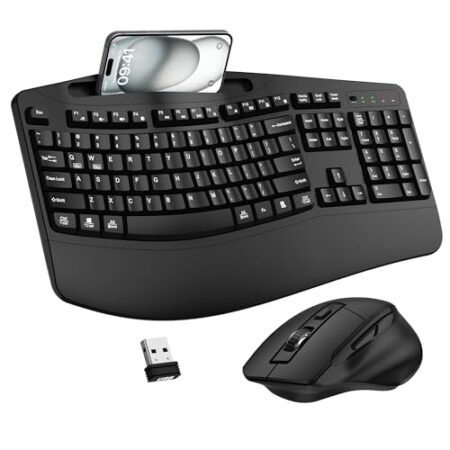
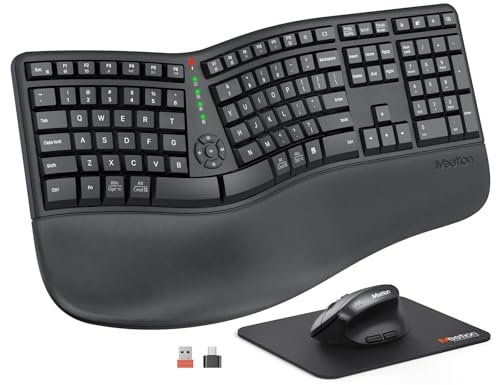
Desk workers haven’t always found speed and comfort in standard setups, but the meetion ergonomic keyboard and mouse combo aims to streamline daily workflows; while standard flat boards force awkward posture, this split layout aligns your arms naturally for faster typing output. Long data entries become noticeably smoother when your forearms stay aligned throughout demanding workdays.
Why it stands out: By pairing a split keyboard with a vertical mouse, this setup targets typing strain from both sides of your workspace. Combining rechargeable internal batteries with dual wireless connectivity options keeps your desk clutter-free without interrupting your task flow.
Upgrading your desktop setup directly impacts output quality and daily stamina. Understanding how these distinct design choices function during long typing sessions helps determine if this setup fits your personal workflow.
MEETION Split Desktop Set Review: Ideal User Profiles
Finding the right desktop layout depends entirely on your workload and daily typing habits. Different professionals require distinct desk arrangements to maximize output without physical fatigue.
- Full-Time Office Analysts: Workers spending eight hours entering data benefit from the natural split posture that keeps forearm muscles relaxed.
- Ergonomic Workspace Seekers: Users looking to replace basic flat peripherals get an all-in-one upgrade that targets hand and wrist fatigue.
- Spreadsheet Power Users: Financial typists who rely heavily on side-scrolling wheels and dedicated number pads can navigate large sheets faster.
Ergonomic Shape & Wrist Angle
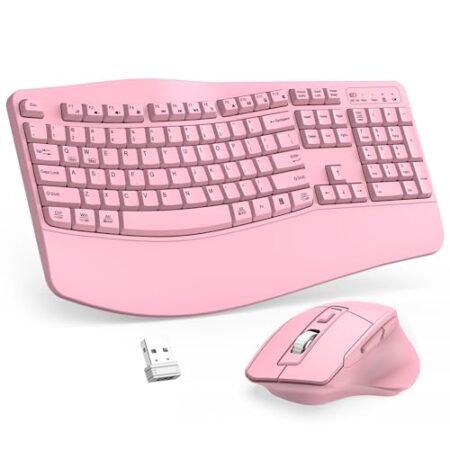
The meetion ergonomic keyboard and mouse combo uses a distinct split frame to keep shoulders dropped and wrists straight. Standard keyboards pull your elbows inward, creating subtle muscular tension across your upper back.
This curved split keyset matches the natural resting angle of human hands. Following medical guidelines on preventing wrist injuries in desk workers helps prevent repetitive strain during heavy typing blocks.
A built-in pillowed wrist rest cushions the base of your palms throughout the day. Soft non-slip material stops your hands from drifting out of position when switching tasks.
Elevating the wrist surface prevents harsh bending upward at the wrist joint. Keeping hands level with keycaps maintains steady typing cadence with minimal vertical reach.
The vertical mouse tilts your hand into a neutral handshake position. Eliminating forearm pronation stops the twist between radius and ulna bones during long browsing sessions.
Combined together, these two devices form a unified neutral workspace layout. Reducing joint stress lets you maintain high typing output across long shifts.
See Current MEETION Pricing
- Live Pricing: Find out exactly what this is selling for right now.
- Shipping Times: See how fast this can arrive at your front door.
- Stock Status: Make sure it is actually in stock before you make a decision.
Switch Options & Tactile Feedback
Quiet membrane key switches give this keyboard a soft and stable feel. Bottoming out keycaps creates minimal noise in shared office environments or home setups.
Travel distance feels moderate and predictable across every row of keys. Quick spring return allows fast touch typists to maintain high accuracy scores.
The vertical mouse features silent micro switches under both main primary buttons. Clicking repeatedly during research tasks produces almost no audible distraction for co-workers.
A dedicated DPI adjustment button alters pointer speed instantly on the mouse. Toggling between 800 and 2400 DPI changes tracking speed for detailed design or fast screen navigation.
An integrated side-scrolling wheel on the vertical mouse speeds up horizontal tracking. Moving across broad file directories requires far less wrist displacement.
Keys respond consistently across the curved geometric keybed layout. Each keystroke delivers distinct tactile resistance without requiring heavy finger exertion.
Keycap Materials & Print Durability
Concave keycap surfaces match the natural curves of human fingertips. Centering your fingers on each keycap prevents accidental keystrokes on adjacent key edges.
Sturdy matte plastic finishes resist oily fingerprint buildup throughout the week. Wiping down the keyboard deck requires only a simple microfiber cloth.
Key legends feature clear high-contrast printing for effortless visual recognition. Wide lettering helps maintain rapid visual alignment when hunting for specific macro shortcuts.
Large spacebars are split across both halves of the main keybed deck. Left and right thumb actuation feels light and balanced regardless of which hand strikes first.
The pillowed palm rest material resists premature wear under continuous wrist contact. Sealed outer padding stops sweat absorption and cleans easily with basic damp wipes.
Solid internal frame construction prevents keybed flex under forceful typing styles. Firm internal bracing maintains structural rigidity across its wide desktop footprint.
Connectivity & Battery Efficiency
Both devices connect using a shared single wireless USB receiver setup. Plugging one small receiver into your computer saves available desktop port connections.
An included USB-C adapter expanding from the standard USB-A receiver helps modern laptop users connect easily. The meetion ergonomic keyboard and mouse combo maintains stable signals up to thirty-three feet away.
Internal 500mAh rechargeable batteries power both the mouse and keyboard deck. Charge cycles last up to two months depending on overall daily operating time.
Recharging both units uses basic 5V 1A USB charging cables without requiring disposable alkaline batteries. Plugging in overnight restores full battery capacity without interrupting work schedules.
Automatic power sleep modes kick in after periods of desktop inactivity. Waking up the system requires a quick single key press or mouse movement.
On-off power toggles on the underside of both units preserve energy during travel. Turning off devices over weekends ensures maximum battery readiness for Monday morning.
Limitations & Operational Drawbacks
Measuring nineteen inches across, the split keyboard demands substantial physical desk real estate. Small compact desks or narrow pull-out tray setups might feel crowded with this unit.
Using the USB-C adapter link requires snapping it directly onto the primary USB-A receiver dongle. Misplacing the tiny base dongle prevents all wireless connectivity until replaced.
Long-Term Value & Verdict
Investing in split ergonomic hardware pays daily dividends in worker comfort and reduced stamina fatigue. Eliminating posture strain keeps daily focus sharp across long operational shifts.
The inclusion of rechargeable internal batteries saves money on continuous battery replacements over time. High build durability ensures both units withstand heavy daily typing tasks reliably.
The verdict: The meetion ergonomic keyboard and mouse combo delivers impressive ergonomic value for busy professionals wanting split comfort without sky-high hardware costs.
Frequently Asked Questions
Does the keyboard require separate software installation?
No extra software is required to start using this wireless combo. Simply plug the USB receiver into an open port and start typing immediately.
Can I use the USB-C cord for a direct wired connection?
The included USB-C connection functions strictly as a charging wire and receiver adapter. Wireless operation via the USB dongle remains required for desktop input.
How long does a full battery charge last?
The built-in 500mAh batteries last between one and two months under standard office use. Battery duration varies depending on daily typing hours and sleep settings.
Do the keyboard and mouse share one USB receiver?
Yes, both devices pair to a single combined USB-A receiver dongle. This single connection keeps your computer ports open for other accessories.
How do I adjust the mouse tracking sensitivity?
Press the dedicated DPI button on top of the vertical mouse to toggle speeds. You can cycle between 800, 1200, 1600, and 2400 DPI settings instantly.
Is the palm rest detachable from the main keyboard deck?
The pillowed wrist rest is permanently built directly into the main keyboard frame. This fixed integration provides consistent support elevation across all typing angles.
Does the vertical mouse feature silent button switches?
Yes, primary right and left click buttons use silent micro switches. Clicking creates minimal sound, making it ideal for quiet work environments.
What charging power source should I use?
Use a standard 5V 1A power adapter or basic USB computer port for charging. Avoid using high-voltage fast chargers to protect long-term battery lifespan.
Specifications
Ready to Upgrade Your Workspace?
9/10 Editor's Rating- Free Shipping: Eligible for fast and free delivery to your door
- Manufacturer Warranty: Backed by full brand support and coverage
- Flexible Returns: Shop with complete buyer protection and peace of mind
More Ergonomic Keyboards Reviews