Nulea Wireless Ergonomic Keyboard Ultimate Review: Is It Worth the Money? (2026)
Check Nulea Wireless Ergonomic Keyboard Pricing
8.9/10 Editor's Rating- Active Offers: View current discounts and promotional deals
- Free Delivery: Eligible for free shipping and free returns
- Stock Status: Check real-time stock and configuration options
What We Like
- Natural split design reduces wrist strain
- Soft integrated leatherette wrist rest cushion
- Long lasting 200 hour rechargeable battery
- Easy dual mode Bluetooth and USB switching
What Could Be Better
- Fixed membrane keys lack mechanical customization
- Requires significant desktop footprint space
Jump to Section
- Nulea Split Desk Board Review: Ideal User Profiles
- Curved Architecture and Integrated Wrist Cushioning
- Switch Tactility and Quiet Membrane Performance
- Dual-Mode Wireless Connectivity and Power Management
- Keycap Texture and Frame Structural Integrity
- Negative Flaws and Operational Limitations
- Long-Term Value and Final Verdict
- Frequently Asked Questions
- Specifications
A faint plastic clack reverberates across the desk as fingers press down on the keys during an early morning shift. Upgrading to the nulea wireless ergonomic keyboard transforms how your hands align throughout an intense 10-hour workday.
Desk workers often struggle with wrist fatigue after hours of repetitive data entry or typing. This split board addresses underlying strain by encouraging a neutral posture from your very first email.
Why it stands out: By combining dual-mode wireless connectivity with a plush leatherette palm rest, this desktop accessory promises physical comfort alongside long-term durability. It delivers a reliable daily experience for remote employees who need consistent comfort without delicate mechanical parts.
Nulea Split Desk Board Review: Ideal User Profiles
Selecting the right split board depends heavily on your daily typing volume and physical setup. Specific user groups will benefit most from this curved layout during extended work sessions.
- Active Remote Professionals: Desk workers typing 8+ hours daily who need targeted wrist fatigue relief.
- Multi-Device Power Users: Employees switching constantly between a work desktop and personal laptop.
- Ergonomic Beginners: Typists seeking an affordable entry point into angled keyboards without steep learning curves.
Curved Architecture and Integrated Wrist Cushioning
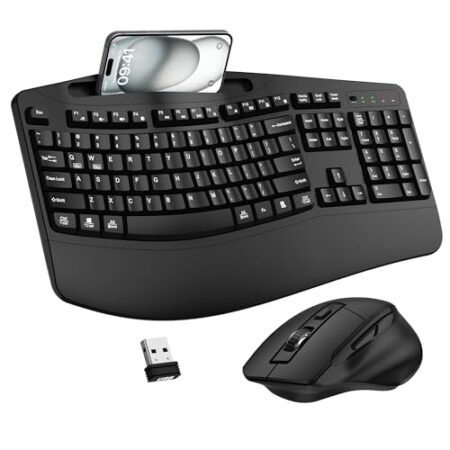
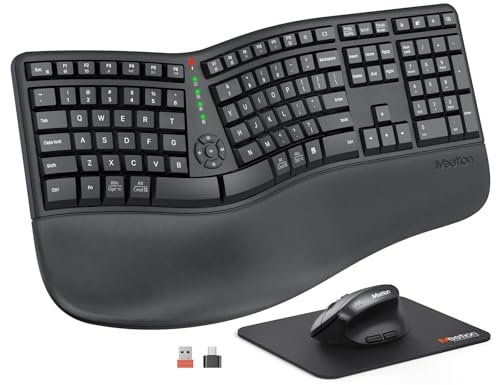
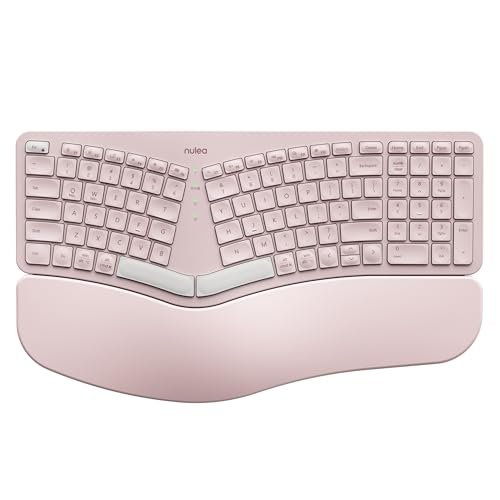
The primary appeal of this board centers on its angled key bed, which splits standard rows into two distinct clusters. This layout prevents unnatural ulnar deviation, allowing your wrists to remain straight while typing.
An integrated leatherette palm cushion extends from the lower edge to keep hands elevated at an optimal angle. Soft internal foam absorbs downward pressure during long hours at your computer station.
Three adjustable tilt legs beneath the chassis allow users to alter the board inclination easily. You can switch between negative, neutral, or positive pitch depending on your desk surface height.
Promoting proper wrist positioning helps prevent micro-trauma during repetitive daily tasks from 9:00 AM to 5:00 PM. Long-term usage shows the leatherette covering resists peeling under heavy sweat or palm contact.
Slight separation between key groups requires a minor learning curve for typists accustomed to straight layouts. Most users adapt within a few days and notice reduced forearm muscle tension immediately.
The curved frame keeps shoulders opened naturally, minimizing upper back tightness throughout the week. Sturdy plastic housing ensures the split structure does not flex or bend under heavy hand pressure.
See Current Nulea Pricing
- Live Pricing: Find out exactly what this is selling for right now.
- Shipping Times: See how fast this can arrive at your front door.
- Stock Status: Make sure it is actually in stock before you make a decision.
Switch Tactility and Quiet Membrane Performance
Underneath the keycaps lies a refined membrane structure engineered to provide quiet acoustic feedback. Each key press generates a subtle dampening sound that will not disrupt quiet office environments.
Tactile response remains snappy without requiring excessive actuation force from your fingers during long daily typing sessions. Along with choosing a comfortable board, checking guides on how often you should replace your ergonomic mouse helps ensure your entire desktop setup supports good posture.
The keycaps feature subtle concave scoops that naturally center your fingertips on every stroke. This intentional shape improves overall typing accuracy while reducing accidental key presses.
Membrane switches offer superior longevity against dust infiltration compared to open mechanical switches. You can expect millions of keystrokes without experiencing sticky or unresponsive key actions.
Stabilizer bars under larger keys like the spacebar maintain smooth uniform travel regardless of where your thumb lands. This structural balancing prevents key wobble and preserves consistent resistance across the board.
Typing speed quickly returns to baseline once your muscle memory adjusts to the split alignment. The cushioned bottom-out feeling reduces joint shock during fast typing bursts.
Dual-Mode Wireless Connectivity and Power Management
Connecting to multiple machines is straightforward thanks to built-in Bluetooth and 2.4GHz wireless modes. A small USB receiver provides a stable connection for desktop setups without native Bluetooth.
Switching between a personal laptop and a work computer requires a simple tap of a dedicated channel button. The nulea wireless ergonomic keyboard re-establishes its link almost instantly without noticeable input lag.
An internal rechargeable battery provides up to 200 hours of continuous use on a single charge. This exceptional power efficiency means you only need to plug in every few months under normal usage.
Charging occurs via a standard USB-C port located along the front edge of the keyboard frame. You can continue typing uninterrupted while the internal battery replenishes its charge.
Automatic sleep mode engages after periods of inactivity to conserve battery power throughout the day. Tapping any key instantly wakes the device without dropping your initial keystroke.
Reliable wireless range extends up to 33 feet, allowing clean wire-free desk management. Signal stability remains rock-solid even in environments crowded with competing wireless devices.
Keycap Texture and Frame Structural Integrity
The overall chassis relies on heavy-duty ABS plastic that resists surface scratches and accidental drops. Reinforced internal ribs keep the frame rigid even when applying firm pressure across the split curve.
Keycap legends use a clear printing method designed to prevent fading after months of constant friction. The matte surface finish on each key cap repels oily fingerprints to keep the board looking clean.
Rubberized anti-slip pads along the underside lock the board firmly onto glass, wood, or desk mats. Even during rapid typing sessions, the unit stays anchored in place without shifting around.
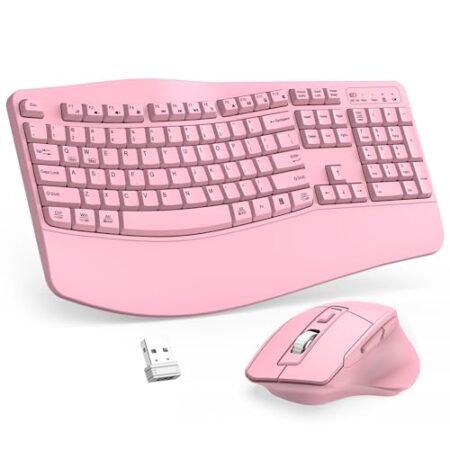
The sleek grey and pink color combination adds a pleasant visual accent to modern home office setups. High structural integrity guarantees the chassis maintains its original shape through years of heavy daily use.
The nulea wireless ergonomic keyboard withstands rigorous daily demands while maintaining its structural balance. Premium assembly tolerances prevent unsightly gaps or creaking plastics along the outer seams.
Maintenance remains simple because smooth keycap surfaces can be wiped clean with a microfiber cloth. Resilient materials ensure the surface aesthetics hold up against daily wear and tear.
Negative Flaws and Operational Limitations
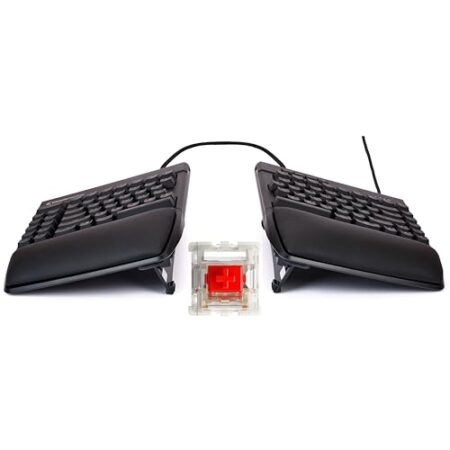
Despite its impressive build quality, the fixed membrane design does not allow users to swap out individual switches or keycaps. Enthusiasts seeking mechanical customization or custom key profiles will find these options restricted.
Also, the wide split footprint demands a sizeable amount of desktop real estate compared to compact tenkeyless boards. Workspace setups with narrow desk depths might feel slightly cramped with this unit in place.
Long-Term Value and Final Verdict
Choosing long-term desk equipment comes down to everyday comfort, battery resilience, and durable construction. Investing in the nulea wireless ergonomic keyboard offers exceptional strain relief that pays off over thousands of typing hours.
By reducing physical fatigue during repetitive daily tasks, this board protects your hands while boosting daily productivity. Solid structural materials ensure the investment holds its value for many years.
The verdict: This split wireless board provides outstanding ergonomic comfort and multi-device convenience at a highly competitive price point. It represents a smart long-term upgrade for any professional seeking relief from daily wrist strain.
Frequently Asked Questions
How long does the battery last on a single charge?
The internal rechargeable battery delivers up to 200 hours of continuous typing on a single charge. Recharging takes only a couple of hours using the included USB-C cable.
Can I connect this keyboard to multiple devices simultaneously?
You can pair the keyboard via Bluetooth and 2.4GHz wireless to seamlessly toggle between multiple devices. Dedicated selector buttons make switching between your computer and tablet fast and effortless.
Is the wrist rest removable?
The leatherette wrist rest is permanently integrated into the frame to maintain structural stability and optimal elevation. Its thick foam padding supports your wrists consistently across every typing angle.
Does this keyboard use mechanical switches?
This keyboard uses quiet dome membrane switches engineered for smooth keystrokes and whisper-quiet operation. The membrane design provides reliable tactile feedback while keeping office noise to a minimum.
How do I change the typing angle?
Flip-out legs located beneath the base offer three distinct angle settings for negative, neutral, or positive tilt. This adjustment helps you tailor the wrist inclination to match your specific desk height.
Does it work with both Mac and Windows operating systems?
The keyboard is fully compatible with Windows, macOS, ChromeOS, and iPadOS devices. Standard key functions automatically adapt to your connected operating system for a smooth experience.
How long does it take to get used to the split layout?
Most users adjust to the split ergonomic layout within two to three days of regular typing. Muscle memory adapts quickly, leading to greater comfort and reduced forearm fatigue.
What are the physical dimensions of the keyboard?
The keyboard measures approximately 16.5 inches long by 9.6 inches wide and 1.3 inches high. Make sure to measure your desk area to ensure ample room for this split layout.
Specifications
Ready to Upgrade Your Workspace?
8.9/10 Editor's Rating- Free Shipping: Eligible for fast and free delivery to your door
- Manufacturer Warranty: Backed by full brand support and coverage
- Flexible Returns: Shop with complete buyer protection and peace of mind
More Ergonomic Keyboards Reviews