Amazon Basics 23.8-Inch 1080P Computer Monitor Complete Review: Best Option for You? (2026)
Check Amazon Basics 23.8-Inch 1080P Computer Monitor Pricing
8.9/10 Editor's Rating- Active Offers: View current discounts and promotional deals
- Free Delivery: Eligible for free shipping and free returns
- Stock Status: Check real-time stock and configuration options
What We Like
- 120Hz refresh rate support
- 99% sRGB color gamut
- 1500:1 contrast IPS panel
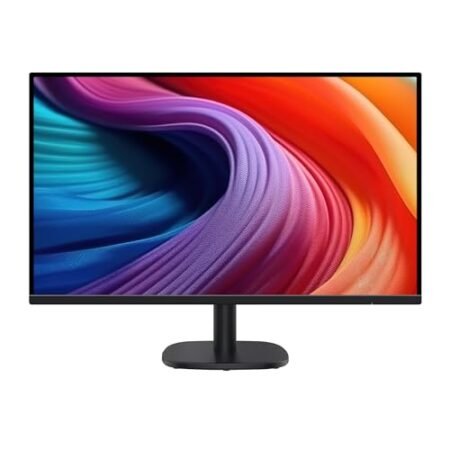
- Four-sided narrow bezel design
What Could Be Better
- Tilt-only desktop stand
- Basic internal audio output
Jump to Section
- Amazon Basics 23.8-Inch Display Review: Ideal User Profiles
- Panel Mechanics & Refresh Rate Performance
- Color Accuracy & Viewing Comfort Features
- Physical Architecture & Connectivity Options
- Energy Efficiency & System Requirements
- Flaws & Limitations to Consider
- Long-Term Value & Verdict
- Frequently Asked Questions
- Specifications
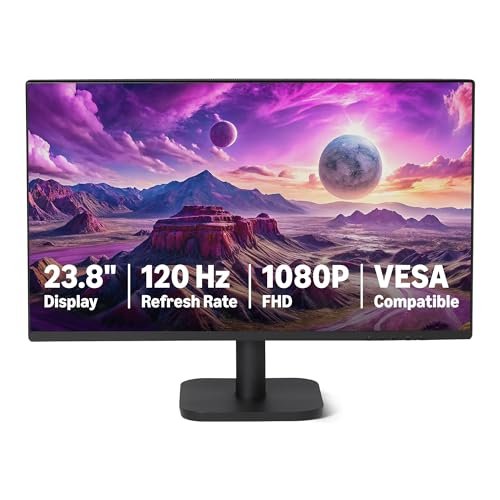
1,500:1 contrast ratios don’t usually appear in entry-level desktop displays, making panel specifications a critical factor for daily office setups. The amazon basics 23.8-inch 1080p computer monitor targets everyday productivity with a fast 120Hz IPS panel that delivers fluid cursor movement and sharp text rendering.
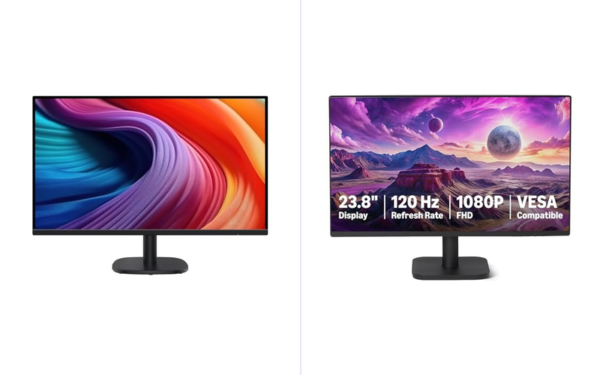
Why it stands out: This panel bridges the gap between basic office screens and entry-level gaming displays by incorporating adaptive synchronization technology. The 4-sided narrow bezel design enables clean dual-screen alignments while maintaining a compact footprint on narrow desks.
Integrated stereo speakers eliminate the immediate need for desktop soundbars during standard video calls. Modern DisplayPort and HDMI inputs ensure straightforward hookups to current desktop graphics cards and workplace laptops.
Amazon Basics 23.8-Inch Display Review: Ideal User Profiles
Selecting an affordable workspace display requires matching technical panel specifications with daily application demands. The overall feature set caters well to specific workflow requirements across multiple user environments.
- Office Professionals: Workers processing spreadsheets and documents benefit from 99% sRGB color reproduction and clear 1080p clarity across extended work shifts.
- Dual-Monitor Users: Multi-taskers gain extra screen space through four-sided narrow bezels that minimize visual gaps between adjoining screens.
- Casual Gamers: PC players enjoying lighter titles benefit from 120Hz refresh rates and Adaptive Sync to prevent screen tearing during movement.
Panel Mechanics & Refresh Rate Performance
A 120Hz refresh rate delivers double the frame output of traditional 60Hz workplace screens during active window management. Mouse cursor movement feels immediate, while fast page scrolling remains crisp without distracting motion blur.
Adaptive Sync synchronizes the panel refresh cycle directly with graphics processing units to reduce visual artifacts. This technology removes screen tearing during casual video playback and light gaming sessions without input lag.
Achieving full 120Hz output requires proper display output settings inside the operating system control panel. Connected devices must use certified HDMI or DisplayPort cabling to sustain the maximum bandwidth profile.
The 1920×1080 resolution on a 23.8-inch diagonal space produces an ideal pixel density for everyday office applications. Text rendering appears crisp without requiring scaling adjustments inside software applications.
Under variable lighting, the anti-glare panel surface keeps screen reflections low across bright room settings. Visual clarity stays consistent even when positioned opposite open windows.
Industry research on how to choose a computer monitor highlights how panel refresh speed directly impacts daily eye stamina. Fast pixel response times keep interface elements legible during swift window movements.
See Current Amazon Basics Pricing
- Live Pricing: Find out exactly what this is selling for right now.
- Shipping Times: See how fast this can arrive at your front door.
- Stock Status: Make sure it is actually in stock before you make a decision.
Color Accuracy & Viewing Comfort Features
The 99% sRGB color coverage delivers rich color saturation across photo viewing and web content. Colors stay accurate without oversaturating natural skin tones or graphics asset files.
A 1500:1 static contrast ratio yields deeper black levels than typical budget IPS panels. Shadow details remain visible inside dark image regions and complex document backgrounds.
In-Plane Switching technology maintains consistent brightness levels across wide 178-degree viewing angles. Color shifting stays minimal when viewing the display from side angles or elevated seating positions.
Built-in LowBlue Light hardware modes filter blue light emissions without shifting screen hues toward heavy yellow tones. Reducing harsh light spectrums helps maintain focus during long afternoon work sessions.
Flicker-Free backlighting removes subtle backlight pulsing that often causes subtle eye fatigue. Direct current dimming stabilizes screen illumination to prevent visual strain.
Software control menus allow quick toggling between color presets tailored for reading, movie viewing, or general web browsing. Custom color temperature adjustments let users fine-tune RGB channels individually.
Physical Architecture & Connectivity Options
The four-sided narrow bezel border creates an expansive screen-to-body layout with minimal plastic framing. Borderless edges enable uninterrupted mouse movement across multi-monitor desktop setups.
Rear input ports feature one HDMI 1.4 port along with a dedicated DisplayPort 1.2 connection interface. Video source switching between work notebooks and desktop towers requires just a quick menu button push.
Integrated dual two-watt speakers handle system notification chimes and casual audio playback without extra desk clutter. Sound output remains clear enough for voice calls and basic training videos.
A dedicated 3.5mm audio output connection lets users route audio directly to headphones or external desk speakers. Audio pass-through simplifies cable management by keeping wires behind the panel enclosure.
The compact desktop base offers solid stability while occupying minimal workspace footprint. Cable routing channels integrated into the stand help keep power cords tucked away cleanly.
Standard VESA mounting compatibility allows mounting the display onto secondary monitor arms or wall brackets. Removing the stock base opens up desktop area for compact keyboards and desk pads.
Energy Efficiency & System Requirements
Low power consumption keeps operating temperatures down during full working days. The internal power converter draws minimal energy while driving maximum panel brightness.
Graphics card hardware must support modern display standards to unlock 120Hz refresh rate functionality. Updating graphics drivers ensures seamless handshakes over HDMI and DisplayPort interfaces.
System control settings within operating systems require manual selection of higher refresh rates upon first connection. Default OS drivers often revert to 60Hz until adjusted inside advanced display parameters.
Silent operation remains constant because passive thermal cooling eliminates noisy internal cooling fans. Solid-state internal components maintain stable thermal thresholds during uninterrupted operation.
Sturdy housing plastics shield internal driver boards while keeping total monitor weight under seven pounds. Light physical weight simplifies monitor arm adjustments and desktop reconfigurations.
Standard power cables connect directly without cumbersome external power bricks cluttering desk footwells. Internal power management components maintain steady voltage levels during continuous operation.
Flaws & Limitations to Consider
The included tilt-only stand lacks vertical height adjustments and swivel capabilities out of the box. Users seeking ergonomic height positioning will need an aftermarket VESA arm mounting solution.
Integrated two-watt speakers offer basic audio output that lacks deep bass response for immersive music listening. Serious media consumption requires connecting external dedicated speakers via the audio output jack.
Long-Term Value & Verdict
Combining a 120Hz refresh rate with 99% sRGB coverage yields strong performance for standard office environments. Reliable IPS panel stability ensures smooth visuals across multi-year operational lifespans.
Low power draw combined with durable physical housing components minimizes maintenance demands over extended daily usage. Multi-input connectivity preserves compatibility as workplace hardware setups evolve.
The verdict: The Amazon Basics 23.8-Inch 1080P Computer Monitor offers impressive smoothness and color fidelity for general desktop setups. It stands as a practical desktop upgrade for professionals wanting higher frame rates and clean multi-monitor capabilities.
Frequently Asked Questions
How do I enable the 120Hz refresh rate on this monitor?
You must connect the monitor using a certified HDMI or DisplayPort cable attached to a compatible graphics output. Afterwards, navigate to your operating system’s Advanced Display Settings and select 120Hz from the refresh rate dropdown menu.
Does this 23.8-inch display support VESA mounting?
Yes, the rear chassis includes standard VESA mounting holes for attaching aftermarket monitor arms. Mounting the panel frees up valuable surface area on compact work desks.
Are built-in speakers included with this computer monitor?
Yes, the panel features integrated dual two-watt speakers for general system audio and call playback. You can also connect external headphones using the rear 3.5mm audio output port.
Does the monitor screen feature glare reduction technology?
Yes, the IPS panel includes an anti-glare treatment that minimizes ambient reflections. LowBlue Light and Flicker-Free features also enhance viewing comfort during long work sessions.
Can I connect two computer systems to this display simultaneously?
Yes, you can connect one device via HDMI 1.4 and another via DisplayPort 1.2 simultaneously. Switching between active video inputs is easily managed through the monitor’s display menu buttons.
Specifications
Ready to Upgrade Your Workspace?
8.9/10 Editor's Rating- Free Shipping: Eligible for fast and free delivery to your door
- Manufacturer Warranty: Backed by full brand support and coverage
- Flexible Returns: Shop with complete buyer protection and peace of mind
More 4K & High-Res Monitors Reviews