Gawfolk 3840X2160 32-Inch 4K Curved Monitor Full Review: Is It Good Value? (2026)
Check Gawfolk 3840X2160 32-Inch 4K Curved Monitor Pricing
9/10 Editor's Rating- Active Offers: View current discounts and promotional deals
- Free Delivery: Eligible for free shipping and free returns
- Stock Status: Check real-time stock and configuration options
What We Like
- Sharp 4K UHD screen resolution
- Immersive 1500R curved VA panel
- Tear-free AMD FreeSync support
- Versatile HDMI and DisplayPort connectivity
What Could Be Better
- Lacks height adjustment on stand
- Integrated speakers lack low bass
Jump to Section
- Gawfolk 32-Inch Curved Display Review: Ideal User Profiles
- Panel Clarity & Contrast Mechanics
- Motion Handling & Gaming Functionality
- Color Performance & Interface Connectivity
- Ergonomics, Mounting & Chassis Build
- Flaws & Physical Limitations
- Long-Term Value & Verdict
- Frequently Asked Questions
- Specifications
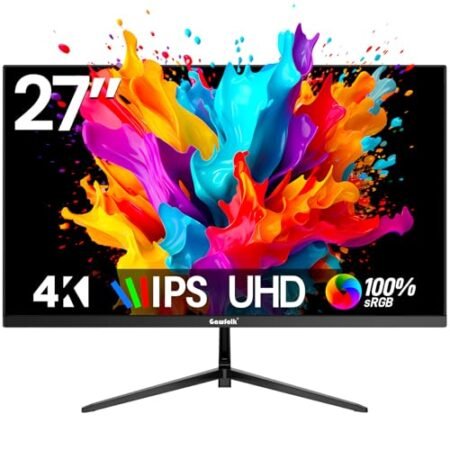
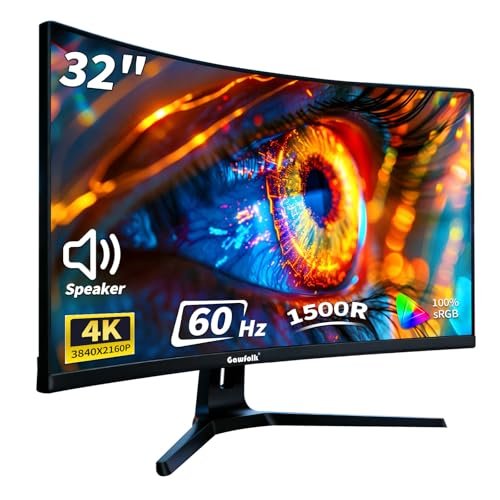
Although standard office displays often turn daily multitasking into a frustrating cycle of window tiling and endless eye strain, the gawfolk 3840×2160 32-inch 4k curved monitor upgrades your desktop with ultra-high-definition canvas space. This monitor pairs dense panel resolution with a gentle curvature to keep full-screen workflows naturally within your primary field of view.
Why it stands out: The panel merges native 3840×2160 pixels across a spacious 32-inch VA display that delivers deep contrast performance. Integrated speaker drivers and multiple high-bandwidth digital ports ensure ready connectivity for workstations and media consoles alike.
Setting up a workstation requires balancing screen real estate against daily desktop space limits. The curved geometry keeps outer corners accessible without forcing constant neck turning during prolonged tasks.
Gawfolk 32-Inch Curved Display Review: Ideal User Profiles
Selecting the right desktop display depends on your primary daily applications and workspace dimensions. The following profiles highlight who will gain the most functionality from this curved panel layout.
- Spreadsheet Power Users: Data analysts gain clear text rendering across thousands of active cells without scaling artifacts. The expansive pixel canvas eliminates horizontal scrolling while keeping numbers sharp.
- Casual Home Gamers: Enthusiasts playing strategy or story games enjoy tear-free rendering powered by adaptive frame synchronization. Fluid visual pacing pairs smoothly with immersive atmospheric game environments.
- Multi-Device Creators: Video editors can switch seamlessly between connected laptops and desktop rigs using dual input interfaces. Built-in audio monitoring allows instant sound checks without cluttered external speakers.
Panel Clarity & Contrast Mechanics
The high pixel density across the 32-inch glass canvas sharpens small text strings and fine geometric lines. Working with split windows feels effortless because each pane maintains crisp image rendering.
Underneath the anti-glare finish lies a VA panel built for deep static contrast levels. Independent laboratory testing on contrast ratio benchmarks in display panel testing confirms that high static contrast improves dark room movie viewing.
The 1500R curvature wraps the outer edges toward your eye position to lower optical distortion. This physical curve reduces constant eye recalibration when scanning across wide timeline tracks.
Shadow detail remains pronounced across dark photo editing environments and nocturnal gaming scenes. Backlight bleeding stays controlled along the perimeter during full-screen video playback.
Long workdays become easier on vision thanks to flicker-free backlighting dimming controls. Reducing high-frequency LED pulse flickering stops optical fatigue before headache onset occurs.
Using the gawfolk 3840×2160 32-inch 4k curved monitor for daily tasks unlocks expansive desktop real estate. The crisp pixel density ensures documents remain legible even at smaller font scales.
See Current Gawfolk Pricing
- Live Pricing: Find out exactly what this is selling for right now.
- Shipping Times: See how fast this can arrive at your front door.
- Stock Status: Make sure it is actually in stock before you make a decision.
Motion Handling & Gaming Functionality
A steady 60Hz refresh rate delivers stable frames for everyday computing and mainstream gaming titles. Motion rendering feels consistent when dragging windows across software suites or playing simulation games.
Onboard adaptive synchronization syncs the panel refresh rhythm with your graphics processor output. Eliminating horizontal screen tearing keeps gameplay motion looking clean during panning camera movements.
Low signal input latency guarantees immediate cursor reaction when clicking small interface elements. Rapid keystrokes translate onto the display grid without distracting input delays.
Overdrive adjustments help control motion blur when high-contrast objects move across dark backgrounds. Setting the response tuning to medium maintains clarity while preventing noticeable trailing halos.
Console players can connect current video hardware through the HDMI ports for full resolution output. The panel downscales or matches signals smoothly while maintaining vivid color saturation.
Casual gaming sessions benefit from steady frame delivery without flickering artifacts. The combined visual clarity makes immersive single-player worlds feel expansive and detailed.
Color Performance & Interface Connectivity
The panel covers 85 percent of the NTSC color gamut to produce vibrant skin tones and saturated graphics landscapes. Broad viewing angles up to 178 degrees prevent color shifting when sharing screen content with colleagues.
Dual HDMI 2.0 inputs alongside two DisplayPort 1.4 connections allow four devices to stay wired simultaneously. You can leave work laptops, personal desktops, and game consoles connected without swapping cables.
Integrated stereo speakers handle routine video meetings and system notifications right out of the box. Eliminating desktop soundbars helps maintain a clean workspace footprint on small desks.
A rear 3.5mm audio passthrough port lets you plug headphones directly into the screen body. This routing option prevents short headset cables from stretching down to floor-mounted PC towers.
On-screen menu navigation buttons allow quick adjustments to brightness levels and color presets. Selecting preset viewing modes optimizes dynamic contrast settings for reading text or watching cinema content.
Setting up a multi-source desk layout with this display keeps all source cables neatly tucked behind the neck. Operating the gawfolk 3840×2160 32-inch 4k curved monitor alongside a secondary screen provides smooth desktop extension.
Ergonomics, Mounting & Chassis Build
The included stand offers tilt adjustments from negative 5 degrees forward to positive 15 degrees backward. Finding the right viewing angle helps align your eye line to reduce neck stiffness.
A standard 100x100mm VESA pattern on the back panel supports third-party monitor arms and wall brackets. Removing the stock base frees up valuable desk real estate underneath the screen.
Slim side bezels maximize active screen surface area while minimizing visual gaps in dual-monitor configurations. The matte black casing resists fingerprints and blends cleanly into modern office decor.
Lightweight construction ensures easy mounting on standard gas-spring monitor arms. The rigid chassis resists flexing when adjusting vertical screen angles throughout the workday.
External power adapter components keep thermal buildup away from internal display panel circuitry. This design choice maintains cooler operating surface temperatures during extended daytime shifts.
Daily interaction with the physical controls feels straightforward thanks to tactile rear button placement. Adjusting display parameters takes only a few seconds without obscuring the active screen area.
Flaws & Physical Limitations
While the panel delivers impressive resolution, the stand lacks height and swivel adjustments out of the box. Users seeking vertical elevation must rely on stackable desktop risers or aftermarket VESA arms.
The built-in speakers provide basic audio functionality, but they lack deep bass response for heavy media consumption. Connecting external desktop speakers or wired headphones remains ideal for music listening.
Long-Term Value & Verdict
Investing in a spacious curved display provides immediate productivity benefits through improved window organization. Dense pixel layouts reduce workspace clutter by allowing multiple full-sized documents to sit side by side.
Durable panel assembly combined with versatile digital inputs ensures long-term utility across shifting workstation needs. The addition of flicker-free eye care protects optical comfort over years of daily usage.
The verdict: Choosing the gawfolk 3840×2160 32-inch 4k curved monitor delivers expansive screen real estate and rich contrast for home offices. Its blend of high pixel density and immersive curvature makes it a solid desktop upgrade.
Frequently Asked Questions
Does this monitor support wall mounting?
Yes, the display features a standard 100x100mm VESA mounting pattern on the back panel. You can easily attach it to third-party monitor arms or wall brackets after removing the stock stand.
What ports are available on the back panel?
The panel includes two HDMI 2.0 ports and two DisplayPort 1.4 inputs for connecting multiple sources. It also features a 3.5mm headphone jack to route audio directly to external headphones.
Are built-in speakers included with this display?
Yes, the monitor comes with integrated stereo speakers that output sound right out of the box. They handle web calls and video playback without requiring external desktop speakers.
How does the 1500R curvature help during long work sessions?
The gentle curve wraps screen edges closer to your natural focal distance across the 32-inch panel. This design lowers eye movement strain when shifting focus from the screen center to the corners.
Is this screen suitable for gaming?
The display handles casual gaming effectively thanks to a 60Hz refresh rate and adaptive synchronization. Low input lag prevents tearing and delivers smooth visuals in story and strategy games.
Does the included stand adjust for height?
No, the stock stand only offers tilt adjustments between negative 5 and positive 15 degrees. For height adjustments, you will need to mount the screen on an adjustable monitor arm.
What eye comfort features are built into the panel?
The panel utilizes flicker-free backlight dimming to reduce optical strain during long computing sessions. This technology helps prevent eye fatigue during extended document editing or media viewing.
Specifications
Ready to Upgrade Your Workspace?
9/10 Editor's Rating- Free Shipping: Eligible for fast and free delivery to your door
- Manufacturer Warranty: Backed by full brand support and coverage
- Flexible Returns: Shop with complete buyer protection and peace of mind
More 4K & High-Res Monitors Reviews